Setting Up Call Defaults
For most service organizations, calls generally fall into a small number of typical patterns. Streamline the data entry required for recording call information by setting up multiple sets of default call information to be applied to calls when they are created.
Note: Set up defaults for call quotes with the same maintenance function.
The call defaults serve as templates for the typical kinds of calls you take and are often based on work code. You can override the defaults for individual calls. For example, you might need to assign a problem/skill other than the default. To minimize changes for new calls, enter default information that is appropriate for as many calls as possible.
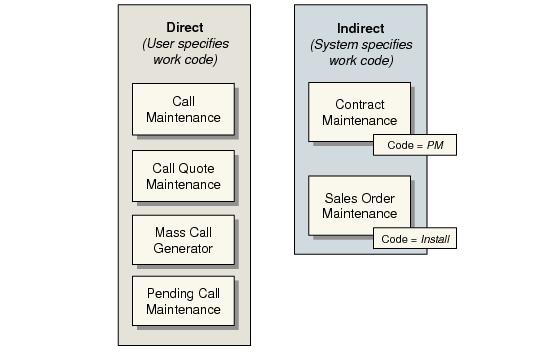
You can create calls directly and indirectly. Create them directly with Call Maintenance (11.1.1.1) or the Call Generator, or by releasing a quote to a call. Calls are created indirectly in either of two ways.
• The system creates PM calls as part of the scheduling associated with Contract Maintenance (11.5.13.1). PM calls are always created with the PM work code, as defined with Call Management Control, and any defaults set up for it in Call Default Maintenance (11.1.21.10). The PM call is set up in the same currency as its associated contract.
• The system creates installation calls when you post a sales order or RMA invoice and an item on the order is defined as requiring an installation call. Installation calls are always created with the install work code, as defined with Call Management Control, and any defaults set up for it in Call Default Maintenance. The install call is set up in the same currency as the sales order that initiated it.
Call Defaults Used in Call Creation
Regardless of how the call is created, the system searches for an appropriate set of defaults when it builds the call record. When you create calls or call quotes manually and call or call quote defaults exist, a pop-up enables you to specify the values for the system to use in searching for appropriate values. If no defaults exist, this pop-up does not display.
See
Call Default Precedence for details on the order in which call defaults are processed.
Using Call Defaults with Escalations
You can use call defaults in conjunction with escalations. If both are in effect when you create a call in Call Maintenance, some defaults may not be used. When you create a call directly in Call Maintenance, the escalation sequence always determines the values for Status, Next Status, and Queue.
Calls created by the system in the background—installation calls from invoice post and PM calls from contract schedules—are not initially affected by escalations. This is because these calls are normally scheduled some time in advance. The system escalates the call only after the call reaches the next status date and time initially set by the system.
Default Key Values
Call defaults are built around three key call attributes: work code, model, and service group. When you define a set of defaults, you use one or more of these keys. Then when you create a call in Call Maintenance, you can select the set of defaults you want to use based on this key.
If the system cannot find a set of defaults that matches the values specified on the Call Defaults pop-up, it continues looking for less exact matches. The system looks for call defaults with any combination of values in the key in the sequence listed in
Search Order for Call Default Key Values.
Search Order for Call Default Key Values
Search Order | Work Code | Model | Service Group |
1 | | | |
2 | | | |
3 | | | |
4 | | | |
5 | | | |
6 | | | |
7 | | | |
8 | | | |
Note: The value the system uses for category in the search is determined by the program executing the search. From Call Maintenance, category is always call. From Call Quote Maintenance, category is always quote.
Call Default Maintenance
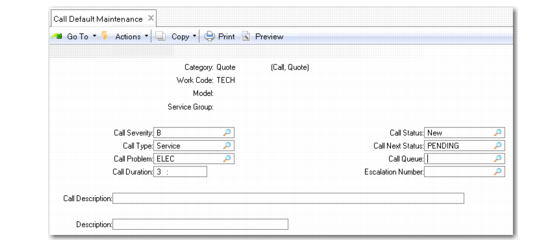
Define default call information with Call Default Maintenance (11.1.21.10).
Call Default Maintenance (11.1.21.10)
Category (Call/Quote)
Category must be either Call or Quote and determines where the defaults are used. Call Maintenance uses only call defaults with a call category. Call Quote Maintenance uses only defaults with a quote category. To define a set of generic defaults for all calls, specify call in the Category field and leave the other key fields blank.
Work Code
This field can be blank. If specified, it is part of the default search key, and enables you to base call defaults on the kind of work being done. Work codes provide a general means for categorizing the kind of work needed to address a call, and tie into invoicing and service limits. Define work codes with Work Code Maintenance (11.21.1).
Define default work codes in Call Management Control (11.1.24). The system uses these defaults when calls are created as follows:
• The technical work code when calls are created with Call Maintenance
• The install work code for automatically generated installation calls
• The PM work code for automatically generated preventive maintenance calls.
Model
This field can be blank. If specified, it is part of the default search key. Specify the model when you set up an item with Service Item Maintenance (11.3.7). Model is maintained as part of the installed base record also.
Note: Set up codes in Generalized Codes Maintenance for field pt_model.
Service Group
This field can be blank. If specified, it is part of the default search key. You can assign an item to a service group in Service Item Maintenance (11.3.7). Service groups provide a way to group service cost according to any user-defined criteria.
Note: Set up codes in Generalized Codes Maintenance for field pt_svc_group.
The remaining fields on this frame, except for Remarks, define the actual default information the system uses in Call Maintenance or Call Quote Maintenance. The Remarks field is for reference only; use it to enter remarks about the current defaults.
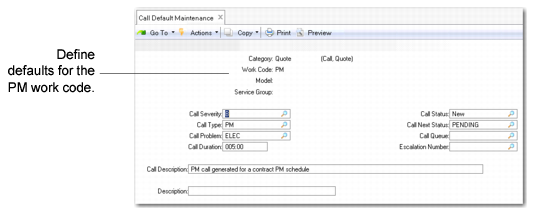
Example: Call default information is established for a preventive maintenance call (work code PM).
Call Defaults for PM Work Code
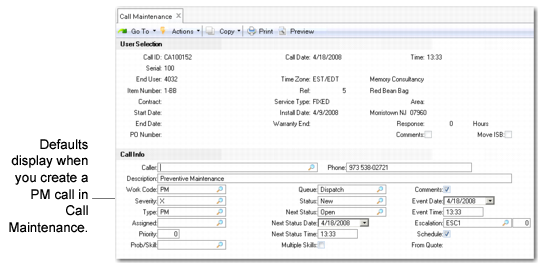
When a user creates a PM call, it looks like
Call Defaults Displayed in Call Maintenance. The system has loads the correct default information into the call.
Call Defaults Displayed in Call Maintenance