Updating Call Records
When a call is linked to an RMA or an SR, the link is by reference only. RMA Maintenance and SR Maintenance use information from the call record, but they do not operate directly on it, other than to create the reference link.
This is not true of the relationship between Call Maintenance and Call Activity Recording. Call Activity Recording is an extension of Call Maintenance. The call record is directly updated from both functions.
Call Record in Call Maintenance
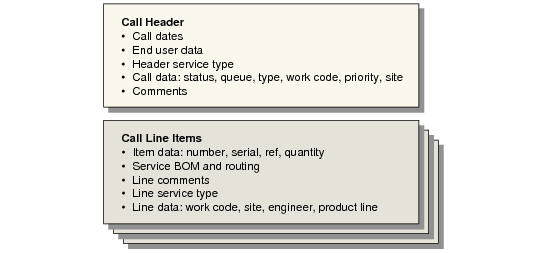
The call record created in Call Maintenance has two parts: the header information and call line information. This distinction is not as clear in Call Maintenance as it is, for example, in RMA Maintenance, where line items are specified in a separate frame. To streamline taking calls and retrieving information from the installed base, you specify the first call item directly in the call header. But the logical distinction remains.
Call Header and Line Items illustrates the two levels of information. There can be many call items, but only one call header.
Call Header and Line Items
The call header provides defaults for some of the line item data. You can modify these elements in the header and at the line level.
Call Record in Call Activity Recording
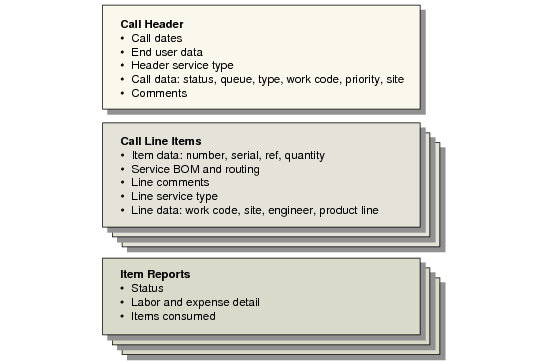
In Call Activity Recording, you can update some of the fields of the call record created in Call Maintenance. Most of the header fields are display-only in CAR and cannot be changed. Line item data can be changed. However, CAR adds a layer of data beneath the line item: the report. Use the report to record the details of labor, expense, and item usage.
Call Header, Line Items, and Reports illustrates the addition of the report level, below the call line item. Each line can have one or more reports.
Call Header, Line Items, and Reports
After a report has been created for a call line item, you cannot modify many of the fields associated with the line. This is true in CAR and in Call Maintenance, since they update the same record. The following details cannot be changed:
• The end user on the call. Contract coverage is specific to end users, and warranty can be based on end-user type. The end user also determines the call’s customer and default bill-to in Call Activity Recording.
• The item number, serial, and reference, which define the item being repaired. The system uses this information to calculate the service type and applicable coverage limits, as well as the default BOM and routing for service activity.
• The quantity of the item. The system multiplies the operation run time and item quantity on the service BOM and routing by the quantity of the item being serviced and also used in installed base updates.
• The service type and work code. The system uses the work code to calculate applicable service limits and determine if the repair is for a fixed price or not. Once you begin recording activity, you cannot change these features.
• The site associated with the item, which CAR uses to determine where service inventory is located.
• The BOM and routing associated with the item, which are exploded in the first report for the item in CAR, defining the default set of items used and operations performed.