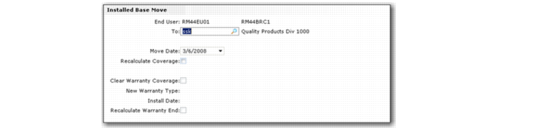
Installed Base Move Frame
Use the Installed Base Move frame to update the location of installed base items from one end user to another. This function is useful for corporations that move equipment between divisions and diverse locations.
You can access the Installed Base Move function when you create a new call or a new call line in the User Selection frame. When you enter a serial number and an end user not previously associated with the item, the system prompts you to update the end user record. If you choose Yes, the Installed Based Move frame opens, which lets you specify the new end user, as well as warranty and coverage options.
See
Installed Base for more information on installed base items.
Installed Base Move Frame
End User
Displays the end user that the item is currently associated with.
To
Specify the end user to which to move the item.
Move Date
Specify the date on which to move the item. The system uses this date to check for contract and warranty coverage.
If you change the default Move Date value, it is most often to a date earlier than the current one. If you set the date ahead, service coverage for the From End User might not be valid, and warranty coverage for the To End User is not valid until the install date.
Recalculate Coverage
If you are moving an item with warranty coverage, the coverage may no longer be appropriate for the new end user. Specify Yes to Recalculate Coverage to choose coverage options.
Clear Warranty Coverage
Select the field to clear the warranty coverage for the new end user.
New Warranty Type
Specify an alternative warranty type for the end user.
Install Date
Specify a new installation date for the item.
Recalculate Warranty End
Select the field to recalculate the warranty end date for the item based on the new install date.
When you complete the fields in the Installed Base Move frame and click Next, the system displays the Items to Move Screen frame.
The Items to Move Screen frame lists the item number, serial number, reference, and item description of the item to move. If the item is a component of a parent configuration, you must move the entire configuration and all of the configuration’s related components.
Items to Move Frame
Item Number
This field displays the item to move.
Serial
This field displays the serial number of the item to move.
Ref
This field displays the reference number for items that are not serial number controlled. For serialized items, the reference is always zero because the serial number must be unique. If an item is not serial controlled, the ISB reference number uniquely identifies the item in the installed base.
Description
This field displays a description of the item to move.
Moved
Indicates if the item has been moved to the new end user.