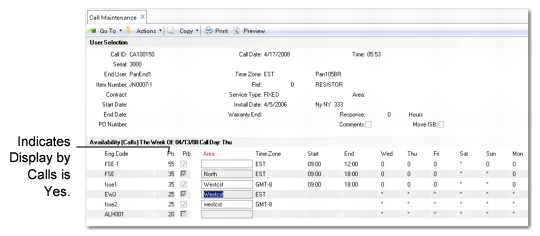
Availability Frame
If the Schedule field is Yes for this call and you have completed the setup required for engineer scheduling, a pop-up window displays, where you can select one or more engineers.
You can assign more than one engineer to a call; however, only one is considered the call engineer. This is the engineer code that displays in the Assigned field in the call header. If you select multiple engineers for assignment and no one is currently assigned to the call, the engineer with the highest point score is considered the call engineer.
To calculate availability, the system follows these steps:
1 Determines which engineers to include based on their availability status and the limiting options selected.
2 Determines each engineer’s total available hours or calls based on working schedules—detail, master, or on-call.
3 Determines how many hours or calls are assigned each day and subtracts them from the available hours or call load to calculate the engineer’s final availability.
This window’s appearance depends on Display by Calls in Engineer Schedule Control. In
Call Maintenance Scheduling, Display by Calls is Yes.
Call Maintenance Scheduling
The system initially displays available engineers prioritized by point totals. Use Pivot to sort the display by area.
The availability frame shows:
• The total number of scheduling points assigned to the engineer. The system calculates points based on the values in Engineer Schedule Control for area, problem, availability, primary engineer, and time zone (when MTZ is active).
Note: Engineer points are used only to recommend engineers for a call; you can still select any one you want.
• Whether the engineer’s skill matches the problem (Prb = Yes).
• The engineer’s area.
• The work schedule for the engineer, used to calculate availability.
Note: If MTZ is active, the engineer’s time zone displays rather than the schedule.
• The time of day the engineer is scheduled to start and stop working on the call’s next status date.
• The number of unconsumed hours or calls for the engineer for the day before and two days after the next status date.
An asterisk (*) under a day of the week indicates the engineer is not available, and two plus signs (++) indicate the engineer is available as a result of an on-call schedule.
Note: When engineers are scheduled, the system uses an infinite schedule. This means the system does not prevent you from scheduling more than 24 hours in a day or more than the engineer’s call load allows. When this happens, the availability points display as a negative quantity.
Select the engineer you want to assign to the call. An asterisk appears to the left of the selected engineer. You can select more than one engineer to assign to each call line.
If an engineer is entered in the Assigned field on the call header, it is not necessary to select the engineer again. Select an engineer if you want more than one engineer assigned to the call. Selecting the same engineer again creates two transactions for the engineer, doubling the individual’s load, which is probably not what you want.