Generating PM Calls
If Create PM Calls is No in Contract Control, the system creates preventive maintenance schedules, but does not actually generate calls. Instead of going through the Contract Maintenance sequence again, generate the calls using the Call Generator
Other reasons may influence you to create PM calls with the Call Generator rather than with Contract Maintenance. The Call Generator offers more control over the calls, since you can specify a call open date. This is important because the system searches for valid coverage limits based on the call open date.
The Call Generator also enables you to keep the number of open calls to a minimum, since calls need not be created until near the time service is due. These issues are discussed in more detail in .
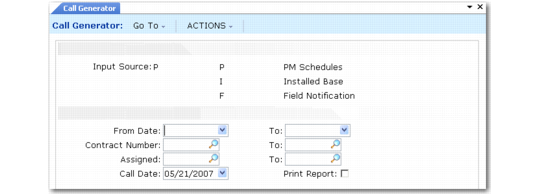
Call Generator for PM Calls illustrates the Call Generator when Input Source is P.
Call Generator for PM Calls
You can generate calls based on a range of schedule dates, a range of contract numbers, and a range of assigned engineers.
When Create PM Calls is Yes in Contract Control, the system creates only the first call on a PM schedule. In the call generator, one call is created for each scheduled date within the date selection range. If your date range is wide, more than one call may be created for a particular schedule.
Example: A item on a contract has a visit scheduled every 30 days, starting on 01/01/07. You execute the Call Generator with a date range of 01/01/07–03/01/07. Three calls are generated for this item.
You can generate a report listing the calls created during the execution of the Call Generator. If you choose not to generate a report, a message displays when the program completes, indicating the number of calls created and the range of call numbers.
Note: To execute the program in batch, specify Yes to Print Report.