Update Field Data
Use Pending Call Field Maintenance (11.1.3.13) to review field information loaded with Pending Call Setup Utility or to create new field information.
When a field that is loaded by the setup utility is used in Call Maintenance, it is marked as not maintainable. In this case, you cannot update the following fields: Type, Active, and Temporary. These field attributes reflect the underlying definition of the database tables that store call data, as well as the requirements of the business logic that is part of Call Maintenance.
The default value for many of the attributes of a field depends on:
• Whether the field is a database field or a local variable
• Whether the field is used in Call Maintenance and affects the business logic related to calls
• Whether the field is loaded by the setup utility or created in Pending Field Maintenance
Default Values for Fields indicates how the default for five field attributes is set based on these conditions.
Default Values for Fields
|
Field Name
|
Loaded DB Fields Used by Call Maint
|
Loaded DB Fields not Used by Call Maint
|
Loaded Local Variables
|
Fields Created in Field Maint
|
|
Maintainable
|
No
|
Yes
|
No
|
Yes
|
|
Active
|
Yes
|
No
|
Yes
|
Yes
|
|
Temporary
|
No
|
No
|
Yes
|
Yes
|
|
Updateable
|
Yes
|
No
|
Yes
|
No
|
|
Required
|
Yes/No
|
No
|
Yes/No
|
No
|
Some field attributes default to Pending Call Frame Maintenance (11.1.3.15) when you add the field to a frame. Attributes such as required, updateable, and default value can be modified for particular frames. See
Define Frame Contents.
Typically, you use this program to:
• Add your own local variables to use in managing the pending call-entry process. When you create your own fields and mark them as active, you can then add them to frames using Pending Call Frame Maintenance.
• Update call fields that are not currently updated in Call Maintenance. For example, you can display any of the user fields in the call master table for update in Pending Call Maintenance and create user-defined labels for them. When you transfer the pending call, the system copies this data from the pending call to the call master.
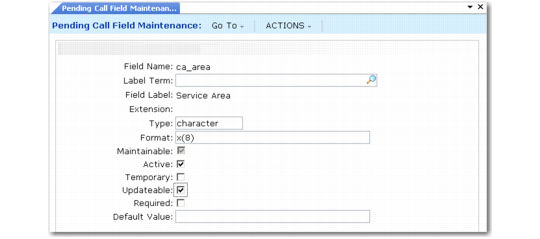
Pending Call Field Maintenance (11.1.3.13)
Field Name
Enter the name of the field (maximum 24 characters) you want to modify or create. This field is required.
Note: You cannot modify or delete any fields with Maintainable set to No. Many of the fields loaded with Pending Call Setup Utility are not maintainable.
By default, any new fields you create are considered temporary. While the value can affect processing in Pending Call Maintenance, the value is not stored in the database.
Label Term
Optionally specify a label term. When a term is specified, the first 20 characters of the label associated with this term display as the label for this field in Pending Call Maintenance.
If you leave Label Term blank, the system retrieves the label associated with the term and field as defined in the label maintenance functions (36.7) on the System Administration menu. If no term exists for the field, the system uses the field name in uppercase letters as the label.
For an existing field, specify a label term only if you want to override the standard label.
Extension
This field displays the type of document being updated in this program. For pending calls, Extension is always Call, and cannot be updated.
Type
Specify the data type of the associated field using standard Progress syntax. Valid values include character, integer, decimal, logical, date.
This field cannot be blank. You cannot update the data type of fields loaded using Pending Call Setup Utility with Maintainable set to No.
Format
Specify the format of the field being added using standard Progress syntax. For example, enter x(24) for a character field that contains 24 characters or >>9 for a three-digit integer field.
This field cannot be blank. You cannot update the format of fields loaded using Pending Call Setup Utility with Maintainable set to No.
Maintainable
This field is set by the system and determines whether the following fields of the associated record can be manually edited: Type, Format, Active, and Temporary. You cannot modify the value determined by the system. The system sets the default as follows:
• Database fields and local variables that are used in Call Maintenance and loaded by Pending Call Setup Utility are set to No. Information about these fields reflects the structure of the tables that support call records and cannot be modified.
• Database fields loaded by Pending Call Setup Utility that are not used in Call Maintenance are set to Yes. You can change values associated with these fields since they do not affect processing of call records.
• Database fields and local variables that you create in Pending Call Field Maintenance are set to Yes. Since these fields are user defined, you can always edit them.
Active
Indicate whether this field can be included on a frame.
No: The field is not included in the lookup browse. If you enter the field name manually, an error displays.
Yes: The field is displayed in the lookup browse of available fields in Pending Call Frame Maintenance and can be selected for inclusion on a frame.
The system sets the default for this field as follows:
• Database fields and local variables that are used in Call Maintenance and loaded by Pending Call Setup Utility are set to Yes. This value cannot be modified.
• Database fields loaded by Pending Call Setup Utility that are not used in Call Maintenance are set to No, and can be changed.
• Database fields and local variables that you create in Pending Call Field Maintenance are set to Yes and can be changed.
Note: If you have placed a field on a frame and then change it to inactive, it no longer displays in Pending Call Maintenance.
Temporary
Indicate whether this field is temporary.
No: The value entered in the field is saved as part of the pending call record. No is the default for database fields loaded using Pending Call Setup Utility.
Yes: The field is used only during the data-entry process and is not saved as part of the pending call record. Yes is the default for new fields that you create in this function, since typically they are not database table fields.
The system sets the default value for this field as follows:
• All database fields loaded by Pending Call Setup Utility are set to No, both those that are used and those that are not used.
• All local variables are set to Yes, both those loaded by Pending Call Setup Utility and those you create with Pending Call Field Maintenance.
You can change the value of Temporary only for fields with Maintainable set to Yes. These are database fields that are not used in Call Maintenance and fields created in Pending Call Field Maintenance.
Note: This field provides flexibility if you add custom database fields and want to save data or if you create your own field data rather than loading it with the setup utility. However, typically you should not change the default values. Setting Temporary to No for a non-database field has no effect, since the system has nowhere to save the value. Setting Temporary to Yes for a database field means data is not saved that may be needed to create a valid call. In this case, errors are generated when you attempt to transfer the pending call to Call Maintenance.
Updateable
Indicate if this field is typically updated by users. The value you specify here sets the default value for the Updateable field when it is added to a frame in Pending Call Frame Maintenance.
No: When you add this field to a frame in Pending Call Frame Maintenance, Updateable defaults to No. If you do not change it in that program, users cannot update the value of the field on the associated frame when they create a pending call.
Yes: When you add this field to a frame in Pending Call Frame Maintenance, Updateable defaults to Yes. If you do not change it, users can update the value of the field when they create a pending call.
When you design frames, you may want some information to display for the user’s information, but not be modified. You also may want to prompt for information on one frame and display it on another. This attribute is controlled by the setting of Updateable in the frame, which defaults from this setting for this field.
The system sets the default value for this field as follows:
• Database fields and local variables that are used in Call Maintenance and loaded by Pending Call Setup Utility are set to Yes.
• Database fields loaded by Pending Call Setup Utility that are not used in Call Maintenance are set to No.
• Database fields and local variables that you create in Pending Call Field Maintenance are set to No.
Note: The item line number and fault code line number cannot be updated in Pending Call Maintenance regardless of the value defined here.
Required
Indicate whether this field is required when a call is created.
No: The pending call transfer function does not generate an error when this field is blank.
Yes: When you transfer a pending call, a value must be specified for this field or the transfer is not completed.
The value you specify here defaults to Pending Call Frame Maintenance when you add this field to a frame. However, you can change it. This lets users leave the field blank during initial call entry, even though a value must be specified before the call can be transferred.
The system sets the default value for this field as follows:
• Database fields and local variables that are used in Call Maintenance and loaded by Pending Call Setup Utility are set to Yes if Call Maintenance requires a value. Otherwise, they are set to No.
• Database fields loaded by Pending Call Setup Utility that are not used in Call Maintenance are set to No.
• Database fields and local variables that you create in Pending Call Field Maintenance are set to No.
Note: You can set Required to Yes for a field you create in this program. You can use this to control whether users must enter a value in Pending Call Maintenance. During transfer, however, the system validates only fields that Call Maintenance requires.
Default Value
Optionally specify a default value to display in this field when this field is added to a frame in Pending Call Frame Maintenance. You can change the default if needed when adding the field to a frame.
The value specified in Pending Call Frame Maintenance sets the default when users create new pending calls in Pending Call Maintenance.
Leave this field blank if you want the system to use the same logic as Call Maintenance to search for a default value for the field.
This field is not validated. You must ensure that the value you specify is consistent with the type and format of the associated field; otherwise, errors are generated during pending call entry or transfer.
For example, for a logical field, specify Yes if you want the field to default to Yes. If you specify a string such as OK, errors are generated either in Pending Call Maintenance or when the call is transferred.
Note: In non-English environments, specify the English Yes or No as the default value for logical fields. These are then displayed to the user in the correct language.