Transferring Calls in Batch
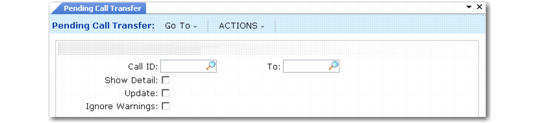
Use Pending Call Transfer (11.1.3.7) to create active calls for a range of pending calls. Set Transfer Calls to No and Show Detail to Yes to view a report of any errors the system detects regarding the pending call data. This option generates a report listing each field in the pending call and any associated error. The report is marked as a simulation, since the database is not actually updated. Correct any errors using Pending Call Maintenance before attempting to transfer the call since errors prevent the transfer from completing successfully.
When you are sure that the range of pending calls you are specifying will not generate any errors, set Transfer Calls to Yes to update the call master table with the new call data.
Pending Call Transfer (11.1.3.7)
Call ID
Enter a range of IDs for pending calls to be transferred. Only pending calls with a status of Entered are selected for transfer.
Show Detail
Indicate whether to display details for all the fields in the pending call record.
No: The report shows one line for each call transferred, including the call ID and status.
Yes: Information is listed for each field in the pending call record, including the field name, field label, and field value. Fields are listed in order for the call header, followed by each call line, followed by each line of fault code information.
Note: You cannot display temporary fields when you use this program to transfer calls. This is possible only with the frame that displays in Pending Call Maintenance. See
Temporary Fields.
Any error or warning messages generated are only included on the report if Show Detail is Yes, since they are associated with specific fields. Unless you are sure that no errors will be generated, set Show Detail to Yes so that you can identify fields that must be modified for the transfer to succeed.
Transfer Calls
Enter Yes to transfer pending call records and create valid call records in the call master table.
Enter No to run this program in report-only mode without updating the database. A report prints for review with SIMULATION displayed at the top of each page.
Ignore Warnings
If Transfer Calls is Yes, indicate whether any warnings generated during the transfer should be ignored.
No: When Transfer Calls is Yes, a call generating a warning is not transferred. The appropriate warning is written to the report.
Yes: When Transfer Calls is Yes, a call is transferred even when it generates one or more warning messages.