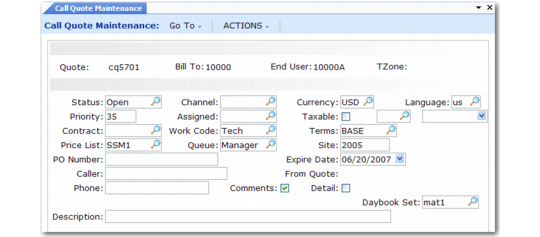
Quote Header Frame
If you are using quote defaults, many header fields have information when they display.
Call Quote Header
Status
Indicate where the quote is in its life cycle, which determines the status of the call created from it. Define statuses of quotes and calls in Call Status Code Maintenance (11.1.21.1). For a new quote, the status defaults first from Call Default Maintenance, then from the Open status in Call Management Control.
Priority
Enter a number indicating how important this call quote is. Lower numbers indicate higher priority. In order of precedence, the value defaults from:
• Call Priority in End User Data Maintenance
• If Call Priority is blank and you select a service contract, the Priority field in Contract Type Maintenance
• If no contract exists, the Priority field of the Default Call Service Type in Call Management Control
• Service/Support User Preferences
Contract
If you previously selected a contract, its number defaults into this field. If not, enter the contract now. The call price list associated with the contract type displays by default in the Price List field when the quote is created. If you change the contract later, you must enter the correct price list.
Price List
Use a repair price list. This field determines prices for service on this quote. If you previously selected a contract, the default is the call price list associated with the contract. If no contract is selected, the default is the price list associated with the Default Call Service Type in Call Management Control.
PO
Specify a purchase order number for the service activity associated with this quote. A warning displays if this field is blank and the end user requires a purchase order. Before you release the quote, you must supply a purchase order.
Caller
Defaults from the primary contact in the end-user record.
Phone
Defaults from the telephone number for the primary contact in the end-user record.
Description
Enter a brief description of the quote. The field defaults from Call Default Maintenance.
Channel
An optional code identifying the distribution channel originating this call quote. Use Channel to determine GL sales account and COGs accounts affected by inventory transactions in CAR and CIR. Set up optional sales accounts with Sales Account Maintenance (1.2.17) based on product line, site, customer type, and channel.
Assigned
If Assign Primary Engineer is Yes in Call Management Control, the Assigned field defaults from the primary engineer assigned to the end user. You can enter another engineer or leave the field blank.
Work Code
If you are not using quote defaults, this field defaults from the technical work code in Call Management Control (11.1.24). Set up work codes in Work Code Maintenance (11.21.1). The work code indicates the type of service performed and affects invoicing and service limits. See
Work Codes for details.
Queue
Enter the queue to which this quote is assigned. Quotes use the same queues as calls, set up with Call Queue Maintenance (11.1.21.7). For a new quote, this field defaults from current quote defaults, then from the user’s default quote queue in Service/Support User Preferences, then from the default quote queue in Call Management Control.
Currency
Defaults from the currency of the customer bill-to record associated with this call. The first time through, you can select any currency, but after you move to the next frame, you cannot change the currency.
Taxable
Sets the default value for each line item, which you can mark individually as taxable or not. If Taxable is Yes, enter a tax class and effective date. See
Taxes in SSM.
Terms
Defaults from the credit terms associated with the bill-to address of the customer initiating the call.
Language
Defaults from the language associated with the end user, then the customer initiating the call. Use Language to select appropriate comments to print on an invoice.
Expire.
Calculated by the system, this field is the current date plus the value in the Days to Expire field in Call Management Control. Expired quotes cannot be released to recording.
Note: If MTZ is active, the expiration date displays with a value relative to the end user’s time zone.
Site
The site on the header determines the default tax environment associated with the quote. Site for items can differ from the call site. For items, the site is the place where repairs are performed or where the assigned engineer gets parts for the service activity. This information is important in Call Activity Recording. The system follows these steps to assign a default site:
• Uses the site/location associated with the assigned engineer in Engineer Maintenance (11.13.1). If you leave the engineer site blank and specify a location, the system uses the area site. The engineer location takes precedence over the area location.
• Uses the site or location associated with the engineer’s area if the engineer does not have a site or location.
• Uses the default spares site/location in Default Site Maintenance (11.21.13) if the above values are blank.
• Uses the site/location defined in the item master if a site still has not been found.
• Uses the site associated with the end user’s customer in Customer Data Maintenance if a site still has not been found.
Reference
When you release this quote to recording, the number of the call created from the quote displays in this field as a reference.
Comments
If Yes, you can review or update comments associated with the quote. After you select or enter comments, you can specify where you want them to print.
Detail
Determines whether the Detail field for each line in the Labor/Expense and Item Usage frames defaults to Yes or No. Set this field in the header for more control over line item entry.