Requirements
For fixed pricing, set up these codes:
• A work code with Fixed Price set to Yes
• A charge code with Fixed Billable set to Yes
• An invoice sort with Include Fixed Prices set to Yes
• Service repair price lists using the fixed price unit of measure
Note: Define the fixed price unit of measure in Call Management Control.
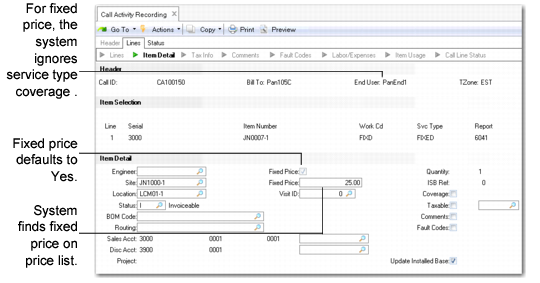
When you specify a work code with Fixed Price set to Yes in CAR, the Fixed Price field in CAR defaults to Yes. The system searches for a price on the call price list with the fixed price unit of measure and uses this price as the repair price. The system also suggests a fixed billable charge code for each line of detail recorded.
Specifying Fixed Pricing in CAR
For fixed pricing, create one invoice sort with Include Fixed Price set to Yes. Do not associate service categories with this invoice sort. Use it exclusively for presenting fixed price amounts in Call Invoice Recording.
Note: When fixed pricing applies, the price, covered amount, and extended price for each recorded detail are zero and cannot be changed.
Multiple Reports
For fixed pricing, you charge the customer a fixed amount regardless of how much work you do. Once you invoice and post the fixed amount, any further reports added to the call line create zero invoice amounts.
You can adjust fixed prices in CAR or CIR until you post an invoice.
Taxes for Fixed Price Services
Normally, the system calculates taxes for each detailed labor, expense, and item usage record. For fixed pricing, it applies the tax rate to the fixed price. It does not consider tax data elements associated with detailed usage records.