Calculating an Initial Charge Code
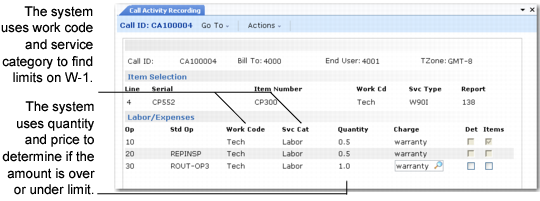
When you enter detail in the Labor/Expense or Item Usage frames of CAR, the system displays a default charge code. The system derives this default using:
• The service type of the call line
• The work code, service category, quantity, and price of the usage detail record
The system uses the work code and service category to search for applicable limits. It uses the quantity and price to determine if the amount on this line of detail is under or over the limits.
Note: For fixed price repairs, no coverage checking takes place. The fixed price billable charge code defined in Default Charge Code Maintenance (11.21.21.13) is always used as the default. You can enter another charge code for the item, but only if it also has fixed price billable set to Yes.
Calculating a Charge Code
For non-fixed price service, the system finds a default charge code using the following steps:
1 The system searches for applicable limits on the line item’s service type. It first searches for limits based on the work code/service category, then based on the invoice sort for the service category, and then based on the total limit record.
• If the service type is a warranty, the system examines the coverage record of the warranty type and uses the associated charge codes. If the warranty covers any amount, the system uses the under-limit charge code, which normally has Warranty set to Yes. If the warranty covers no amount, the system uses the over-limit charge code, which must have Billable set to Yes.
• If a contract covers the call item, the system searches for coverage records at the contract line level, then at the header level, and finally at the contract type level. If a coverage record exists and has a charge code and over-limit charge code, the system uses these. The under-limit charge code normally has Contract set to Yes in Charge Code Maintenance. For the over-limit charge code, Billable must be Yes.
• If you entered a service type for the line or used the default from Call Management Control, the system uses the charge code and over-limit charge code associated with its coverage records. For service types that provide coverage separate from a contract or warranty, you normally have an under-limit charge code with Covered set to Yes. For the over-limit charge code, Billable must be Yes.
2 If the system does not find coverage records or charge codes are not associated with them, it searches for a default charge code set up with Default Charge Code Maintenance (11.21.21.13), using the service type of the call line; the work code and service category of the usage detail; and end-user type of the call.
• If the service type is a warranty and it provides coverage, the default warranty charge code is displayed.
• If the service type is a contract and the line item’s price is within contract limits, the default contract charge code is displayed.
• If coverage exists on the default call service type or a service type that you entered, the default covered charge code is displayed.
• If the warranty, contract, or service type provides no coverage, or the item has exceeded limits, the system displays the default billable charge code.