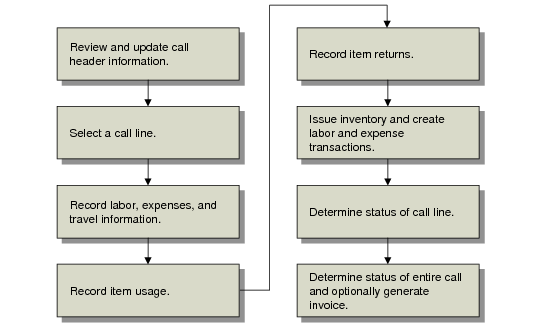
Frame | Req | Purpose |
Header | Y | Select call and display-related information. |
Exchange Rate | N | If currency is non-base, review and update exchange rate. |
Taxes | N | If Taxes is Yes, review header tax defaults. |
Comments | N | If Comments is Yes, view or update call header comments. |
Item Selection | Y | Select call line. |
Item Detail | Y | Display and update call line detail. |
Close Visit | N | If the Visit ID field in Item Detail contains a value, the Close Visit pop-up lets you close the visit. |
Taxes | N | If Taxes is Yes for this line, review line tax defaults. |
Installed Base Detail | N | If Update ISB is Yes and the call line item is not in the ISB, specify ISB parameters and add it to the installed base. |
WIP Product Line | Y | When you access a line for the first time, specify the product line for recording work in process. |
Coverage Information | N | If Coverage is Yes, view applicable limits. |
Comments | N | If Comments is Yes, view or update call line item comments. |
Fault Codes | N | If Fault Codes is Yes, enter or review codes for this line item. |
Material Order Selection | N | If items ordered on an MO exist for the current call line, select and load them as item usage. |
Labor/Expenses | Y | Record operations, labor hours, and expenses for this activity. |
Labor/Expenses Detail | N | If Det is Yes, view and update detailed information about this operation. |
Comments | N | If Comments is Yes, view or update operation comments. |
Item Usage | Y | Record items consumed or exchanged during service activity. |
Item Usage Detail | N | If Det is Yes, view and update item details. |
Multi | N | If Multi is Yes, change allocation details for each item. |
Comments | N | If Comments is Yes, view or update item usage comments. |
Returned Items Detail | N | If Qty Ret is not zero, specify data required for returns and exchanges. |
Multi | N | If Multi is Yes, change return details for each item. |
Fault Codes | N | If Fault Codes is Yes, enter codes for returned items. |
Issue Confirmation | Y | Displays all items about to be issued or returned for your confirmation. |
Output Device | Y | Specify output device for report. |
Call Line Status | Y | Specify call line status. |
Item Dates | N | If Dates is Yes, specify dates related to service activity. |
Call Status | Y | Specify call status and optionally generate invoice. |