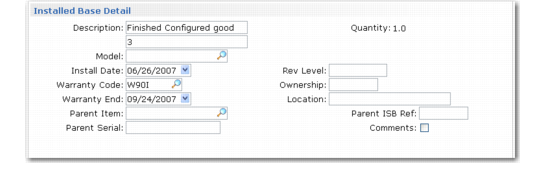
Installed Base Detail Frame
If Update ISB is Yes and the call line item is not in the installed base, enter information for the ISB record in a pop-up. If the line item is a component—for example, the disk drive of a computer—you can specify a parent item and serial number to update the installed base configuration.
Installed Base Detail Frame
Description
The two-line item description from Item Master Maintenance displays. You can change this description as needed.
Quantity
An output-only field indicating the number of items you are adding to the installed base.
Model
The item’s model number, which defaults from the value in Service Item Maintenance.
Install Date
Defaults from the system date and determines when warranty coverage begins.
Warranty Code
Defaults from the item’s warranty in Service Item Maintenance. Warranty Code determines the coverage terms and conditions, including response time, price lists, and days of coverage. If you add an item to the installed base and specify a current warranty code, the system prompts whether you want to use this warranty coverage for the call.
Warranty End
Based on the warranty duration and the install date. If you are adding an item to the installed base with a warranty, specify an expiration date. Warranties cannot be open-ended.
Rev Level
Displays the item’s revision level in the item master.
Ownership
A reference-only field indicating who possesses the item. If the end-user address code refers to a large company, you can enter the department or individual using the item. Define values for ownership with Generalized Codes Maintenance for field isb_owner.
Location
A reference-only field providing a 24-character description of the location of the installed base item at the end-user site. Location can be a building, suite number, or floor.
Parent Item, Serial, ISB Ref
You can track both products and components in the installed base. Use this especially if you have configured products. If you maintain the configuration in the installed base and the customer returns a component such as a PC disk drive, you can relate the new component you issue to the PC.
Use Parent Item to add the current item to the original purchase. Use the Parent Serial and ISB Reference fields to identify the parent item.
Comments
Defaults to Yes if comments exist. Specify Yes to enter or review ISB comments. The Installed Base Report displays comments.