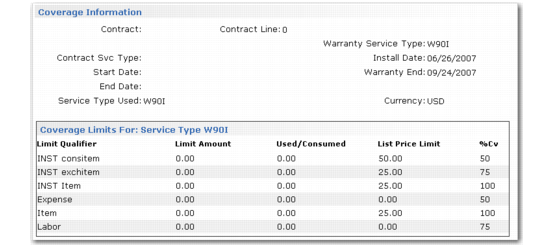
Coverage Information Frame
If Coverage is Yes, the Coverage Information frame displays.
Coverage Information Frame
This frame displays detail about the line item’s coverage limits, effective on the call open date. These limits come from a contract, service type, or warranty, as the frame header indicates. If the coverage limits come from a contract, the limits include the amount you have used in CAR and consumed by posting call invoices.
Note: When MTZ is active, call open date/time are relative to the end user’s time zone.
Limit Qualifier
You can set up limits in one of three ways: as a total record, by invoice sort, or by work/code service category combination. For total records, this column displays Total Limits. Otherwise, it displays the name of the invoice sort or work code/service category. See
Levels and Limits of Service for details on how service limits are defined and applied.
Amount
Displays the limit amount of the service type or contract. If the call does not use base currency, the system converts the amount to the currency displayed in the frame above.
Used/Consumed
This field has a value only for contracts. As you record activity for an item that has a contract, the system accumulates quantity consumed against active limits. The amount in this column combines amounts used on open calls with amounts posted for call invoices. If the call is not using base currency, the system converts the amount to the currency displayed in the frame above.
List Price Limit
Displays the list price limit for the coverage record. When the price of an item recorded for the service activity exceeds this limit, it is not covered even when limits are not exceeded. If the call does not use base currency, the system converts the amount to the currency displayed in the frame above.
% Cv
Displays the level of coverage.