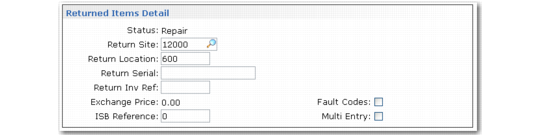
Returned Items Detail Frame
If you specify a return quantity and Detail is Yes, the Returned Items Detail frame displays. Specify the return status and inventory return site and location. If you are returning more than one item, you can access a multiline entry frame. The system uses return serial numbers and ISB reference numbers to remove returned items from the installed base.
Returned Items Detail
Status
The return status defaults from either:
• The default return status in Call Management Control if the item is repairable
• The default scrap status in Call Management Control if the item is not repairable
Note: Repairable items have Repairable set to Yes in Service Item Maintenance.
You can change the return status to any status defined with Return Status Maintenance (11.21.17). However, you can use a Pending status only for items you ordered on an MO and an Exchange status only for items returned from the customer.
Return Site, Location
Depending on the return status and whether or not the item is repairable, the return site and location default as follows:
• To the return site and location, if the item is repairable and Good is Yes for the return status, or if the item is not repairable and Scrap is No.
• To the repair site and location, if the item is repairable and Good is No for the return status.
Note: Set up default sites and locations with Default Site Maintenance (11.21.13).
If you are returning an item from an MO line, the location must allow receipts (RCT-TR). If the return is not from an MO line, the location must allow unplanned receipts (RCT-UNP).
The system searches for default sites and locations based on the returned item’s product line, service group, work code, and item number and the area you specified on the call. Enter a site if no default site exists.
Note: If the item being returned was ordered on an MO, return site and location default from the MO and cannot be changed.
Return Serial
If the item you are returning is lot/serial controlled, enter the serial number. When you return an unused lot/serial controlled item originally loaded from an MO line, this field defaults from the MO line.
If the serial number is in the installed base and Update ISB is Yes for this call line, the system removes the item with this serial number from the installed base. If you are returning multiple serial-controlled items, set Multi Entry to Yes to access a line item entry frame for multiple returns.
Return Inv Ref
Enter the lot reference number of the item you are returning. Lot reference, site, location, and lot/serial number identify inventory quantities. For lot reference, you can use the production lot of the item or a location reference such as a skid, roll, or pallet number.
Exchange Price
If you are exchanging an item that has no coverage, the system searches the header’s repair price list for an exchange price with the exchange unit of measure in Call Management Control. If the exchanged item has coverage, the exchange price defaults to zero.
Note: You cannot exchange an item ordered on an MO.
ISB Reference
All items that do not have serial numbers in the installed base need ISB reference numbers. Specify the ISB reference on a return so the system can exactly identify the item to remove from the installed base.
Fault Codes
If Yes, the fault code window displays so you can specify the reason for the return.
Multi Entry
If you are returning more than one item, specify Yes to access a line-item entry frame. You must use this frame to remove multiple items from the installed base.
When you finish entering data in this frame and click Next, you return to the Op field. Enter additional data until you record all item detail. Click Back to exit the item usage frames.