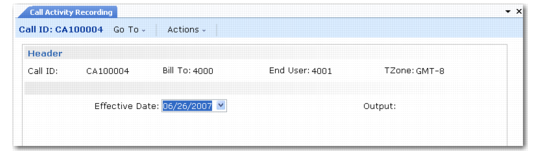
Output Device Frame
If you accept the information in the confirmation frame, the next frame prompts you for an output device.
Output Device Frame
Enter the GL effective date for the transactions and an output device for the report; then click Next to process inventory. The effective date must fall within an open GL calendar period. The system processes inventory and generates a report to the output device.
This report includes:
• Items issued or returned
• Labor/expense transactions
• Updates to the installed base
• Inventory errors or warnings the system encountered during execution
Whether you are generating an invoice or not, items that you recorded as consumed are no longer available in inventory. The system issues them immediately or transfers them to the call line site and issues them.