Invoice Sorts Setup
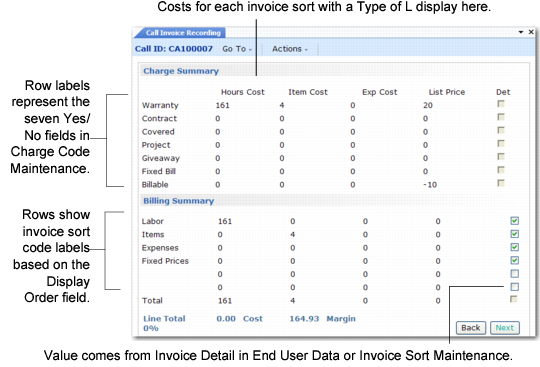
Invoice sort codes determine much of the way the system presents summary information in CIR.
Invoice Sort Maintenance (11.21.5)
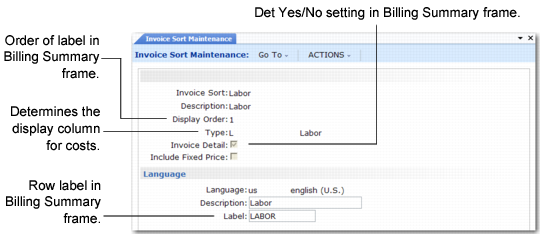
In Invoice Sort Maintenance (11.21.5), you define:
• The type of data summarized by the invoice sort code, represented by the three columns in the Charge Summary frame.
• The row labels and their order in the Billing Summary frame.
• The Yes/No setting of the Det column.
Understanding how invoice sorts are defined is helpful in understanding CIR’s Charge Summary and Billing Summary frames.
Display Order
Determines the sequence in which invoice sort codes display in the Billing Summary frame. Define labels for different languages in the Language frame.
Type
Controls how the system totals costs in the Charge Summary costs. Labor costs display in column 1, item costs in column 2, and expense costs in column 3. Labor is type L, item is type I, and expense is type E.
Invoice Detail
Determines the default in the Det column of the Billing Summary, unless you specify a different invoice format for the end user in End User Data Maintenance.
When Invoice Detail is Yes, you can print detail on the invoice. If Invoice Detail is No, the system totals the entries for a service category into one line item and displays only this total. You can choose Yes or No on each call.
Summary Design shows how the system uses other codes in the design of the CIR summary frames.
Summary Design