Defining a Master Schedule
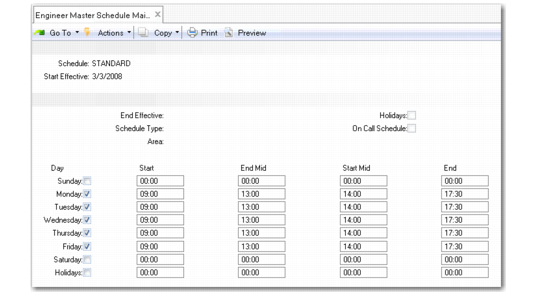
Set up service schedules in Engineer Master Schedule Maintenance (11.13.15.1). You can define a schedule to use as a company-wide basic schedule. You can also use master schedules as the basis for engineer detail schedules and on-call schedules.
Engineer Master Schedule Maintenance (11.13.15.1)
Schedule
Enter the eight-character code that identifies this schedule.
Start Effective and End Effective
When setting up service schedules, you can fill in a start and end effective date. When you specify a schedule, the system uses it only if the system date is within the effective period. If these fields are blank, the schedule is always effective. To set up a schedule for use in On-Call Maintenance, the effective dates must be blank.
Schedule Type
An optional field for grouping schedules. Define schedule type codes in Generalized Codes Maintenance for the field esh_sched_type.
Area
Enter the geographic region to which this schedule applies. Define areas in Area Maintenance. You also associate areas with end users and engineers. This field is for reference only.
Holidays
Indicate whether this schedule applies to holidays. The system uses this field with the Holidays field on the scheduled days and times to determine what hours, if any, an engineer works on a holiday.
• If this Holiday field is Yes, an engineer is available to work on a holiday. The system determines hours of availability by the day of the week on which the holiday falls. For example, if December 25 is a holiday and it falls on a Thursday, the engineer works the hours normally scheduled for Thursdays.
• If this field is No and the lower Holidays field is also No, engineers are not available to work on a holiday.
• If this field is No and the lower Holidays field is Yes, an engineer is available to work on a holiday. The hours of availability come from the hours you associate with the lower Holidays field, regardless of the day of the week of the holiday.
• If both fields are Yes, the first Holidays field takes precedence in determining the hours of availability.
Scheduling for holidays has an effect only if you set up holidays with Area Holiday Maintenance (11.15.9) or Engineer Absence Maintenance (11.13.15.17). If you define holidays for the engineer, the system uses them first, then holidays for the area.
Typically, you create on-call schedules to cover holidays, because most employees do not work during them.
On Call Schedule
This field is display only. When you assign engineers to a schedule using On-Call Maintenance (11.13.9), the system sets this field to Yes.
After you enter information in these fields, indicate the days the schedule covers and the work hours for engineers assigned to the schedule. You can also use the End Mid and Start Mid columns to define a single break in the engineer’s hours for the day, such as for a lunch period. The time between the End Mid and Start Mid columns is considered as non-working time. If no time is entered for a break, the system checks the Lunch Duration field in Engineer Schedule Control (11.13.15.24). If the Lunch Duration field contains a value, the system deducts this value from the total daily time available for scheduling calls. If the Lunch Duration field is also blank, the engineer will be available for the entire working day.
Assign a schedule to an engineer in Engineer Maintenance (11.13.1).