Engineer Maintenance
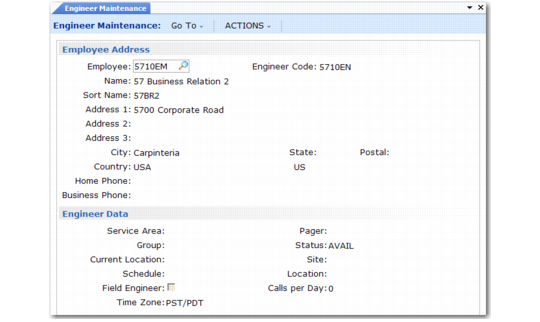
Set up engineer information with Engineer Maintenance (11.13.1), illustrated in
Engineer Maintenance (11.13.1).
Note: Before setting up engineer information, define the engineer as an employee in Employee Create (36.1.7.1).
Engineer Maintenance (11.13.1)
Employee Address Frame
To define an employee as an engineer, enter the employee code in the Employee field. The employee must have an active status. This code defaults into the Engineer Code field. You can choose to set up a separate engineer code referring to this employee.
Example: Some companies prefer to separate employee codes from engineer codes. An engineer’s employee code might be GLB, while the individual is referred to as Eng004 for service engineer functions.
The rest of the Employee Address frame shows employee information in a display-only mode.
Note: When you set up engineer information, the system creates an address record for the engineer with an operational address list type of engineer. Address list types distinguish different kinds of addresses. The system retrieves the address when you specify the engineer as a drop-ship address in Material Order Maintenance.
Engineer Data
Define engineer attributes in the Engineer Data frame. Engineer scheduling uses some fields to recommend an engineer for a call. Engineer paging uses other fields. Other fields are for reference. Call Activity Recording and Material Order Maintenance use Engineer Site and Location.
Service Area
Enter a service area defined in Area Maintenance (11.15.1). Engineer scheduling awards points to engineers whose area matches the area of a call end user. Assign the service area for end users in the Service Office Detail frame of End User Data Maintenance (11.9.1). Define the number of points to assign in Engineer Schedule Control.
Group
Use this field to group engineers according to a method significant for your business practices. For example, you can group engineers by level of expertise or experience.
Note: Set up generalized codes for field fsgroup.
Current Location
Reference-only. This location is not an inventory location. Use this field if you temporarily assign the engineer to a different service center, or if the engineer is working out of his home rather than his regular office. Define location codes in Generalized Codes Maintenance for the field eng_location. If the engineer has a long-term assignment to a particular call, you can specify the call ID for location even when generalized codes validation is in effect.
Schedule
Enter the engineer’s normal work schedule, which defines the hours that the system can assign calls to the engineer. For example, you can set the schedule to assign calls only 8 AM to 5 PM, Monday through Friday. Define schedules in Engineer Master Schedule Maintenance (11.13.15.1) or tailor a schedule for a specific engineer with Engineer Detail Schedule Maintenance (11.13.15.4).
Field Engineer
Indicate where an engineer normally works.
No: The engineer primarily works in-house—for example, providing phone support or at a repair center.
Yes: The engineer usually provides service at an end user’s location. Consider setting this field to Yes if you use Paging.
This field affects call scheduling when Multiple Time Zones is active as well as engineer paging as follows:
• When MTZ is active and Field Engineer is Yes, the system interprets schedule times relative to the end user’s time zone. When No, the system interprets schedule times relative to the engineer’s time zone. See
Multiple Time Zones for details.
• If Field Engineer is Yes and Dispatcher is Yes in Call Management Control, the Page field in Call Maintenance defaults to Yes when you create a new call. When Page is Yes, you can initiate paging to contact the engineer.
Note: A Time Zone field displays when Multiple Time Zones is active. Each engineer must have an associated time zone. See
here for details.
Pager
If you are using the Engineer Paging function, enter the pager number for the engineer.
Status
Enter a status defined in Engineer Status Maintenance (11.13.4). Status is a critical field for engineer scheduling that determines whether the engineer is available or not. If Limit by Availability is Yes in Engineer Schedule Control, call scheduling considers only engineers with an available status.
If you assign an engineer with an unavailable status to a call, a warning displays.
Site and Location
Enter the site and location where this engineer obtains repair parts. The system uses this site and location as a default in Call Activity Recording and material order functions to specify where to order and consume repair parts. Standard site/location logic applies to these fields.
Set up the engineer’s location with an unavailable inventory status so that the system does not allocate items designated for the engineer’s use for other purposes such as sales orders.
Calls per Day
Enter a number representing the average number of calls this engineer can complete in one day. The engineer scheduling function considers this number in calculating engineer availability if Display by Calls is Yes in Engineer Schedule Control.