Engineer Detail Schedules
The engineer scheduling sequence in Call Maintenance uses more than master schedules when calculating engineer availability. It also considers the service coverage of the service type, on-call schedules, and the engineer’s work schedule.
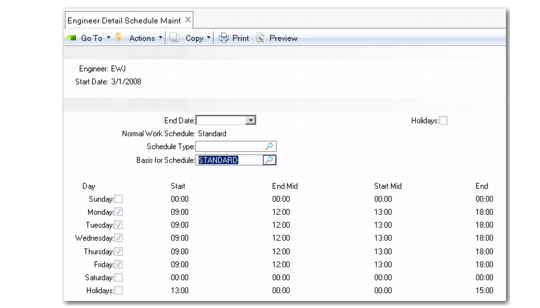
Create individual schedules for an engineer with Engineer Detail Schedule Maintenance (11.13.15.4), illustrated in
Engineer Detail Schedule Maintenance (11.13.15.4). These schedules are useful for contract or part-time personnel or engineers whose schedules do not follow the typical master schedule. Set up alternate schedules for specific periods of time by specifying a start and end effective date.
You can also use an engineer detail schedule to indicate that an engineer is unavailable for a period of time.
Engineer Detail Schedule Maintenance (11.13.15.4)
This function is similar to setting up a master schedule.
Engineer
Enter the engineer code for the employee. The schedule applies to this engineer only.
Start Date/End Date
When setting up service schedules, you can fill in a start and end effective date. The system uses this schedule only if the system date is within the effective period. If these fields are blank, the schedule is always effective.
Normal Work Schedule
The schedule assigned to the engineer in Engineer Maintenance displays in this field. If you leave Basis for Schedule blank, the days and hours from the normal work schedule display as the starting point for creating the detail schedule.
Schedule Type
An optional field for grouping schedules. Define schedule type codes in Generalized Codes Maintenance for the field egd_sched_type.
Basis for Schedule
When you create the detail schedule, you can specify a schedule other than the normal work schedule as the starting point for creating the detail schedule. If you enter a schedule here, its days and hours display in the detail schedule fields.
Holidays
This field displays the value for the Holiday field of the schedule you are using as a basis for this detail schedule.