On-Call Scheduling
To provide service coverage for the periods that fall outside your normal schedule, follow these steps:
1 For the hours that your standard schedule does not cover, create schedules with Master Schedule Maintenance. If you have different engineers covering nights, weekends, or holidays, create more than one schedule. To use master schedules as on-call schedules, set them up without effective dates.
2 Use On-Call Maintenance to specify engineers available to take calls during these time periods. When you link an engineer to a schedule in On-Call Maintenance, the system sets On Call to Yes for the schedule.
3 When you create a call with a next status date and time outside your normal schedule, only engineers that you designated as on call receive availability points.
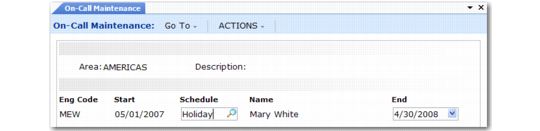
On-Call Maintenance (11.13.9) illustrates On-Call Maintenance (11.13.9).
On-Call Maintenance (11.13.9)
Area and Description
The on-call schedule applies to a particular area, which you define in Area Maintenance. When you specify an area, its description displays beside it. When you take a call after normal business hours for an end user in this area, the system uses the on-call schedule for the area to determine who can respond to the call.
Eng Code and Name
Enter the code identifying an engineer. The employee name for the engineer displays in the Name field.
Start and End
If the engineer is on call only for a specific period of time, enter the beginning and end points defining this period. Leaving these fields blank puts an engineer on permanent on-call status.
Schedule
Enter the name of a schedule that specifies the on-call days and hours. Define these schedules in Engineer Master Schedule Maintenance without a start or end effective date. This prevents confusion in matching the engineer on-call periods with the on-call schedule.
On-Call Hours
Engineer scheduling determines when to schedule a call based on the call’s next status date and time. It searches for a schedule that covers this date and time. If detailed, regular, and on-call schedules exist, all engineers with these schedules display in the Availability window.
To distinguish engineers available for on-call scheduling from others, the system displays two plus signs (++) rather than the number of hours or calls.