QAD 2017 Enterprise Edition
>
User Guides
>
Service/Support Management
>
Material Orders
>
Shipping Material Orders
Shipping Material Orders
You can approach shipping MOs in two ways:
• Ship items in Material Order Maintenance by entering the MO as confirmed and allocated.
• Follow the more traditional approach taken with sales orders where you execute separate confirmation, allocation, and shipment functions. In addition, you can print a packing list using Sales Order Packing List.
Confirming Material Orders
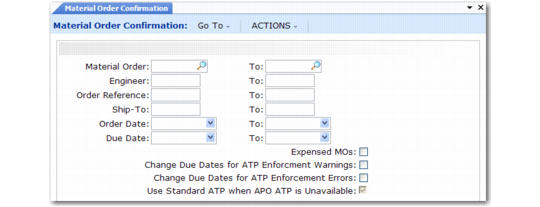
MOs must be confirmed before they can be allocated or shipped. You can do this in a separate step with Material Order Confirmation (11.11.2).
Material Order Confirmation (11.11.2)
Enter appropriate criteria to select MOs for confirmation, then execute the function. The system processes MOs in the specified range. If Expensed MOs is No, the system processes only MOs without a charge code. If Yes, the system includes expensed orders.
When ATP Enforcement Enabled is Yes in Sales Order Control (7.1.24), you can optionally have the system automatically change the due dates before confirming MOs when the available to promise (ATP) quantity is insufficient to fill the order. Based on the ATP enforcement level associated with the item, the system adjusts the due dates for MO lines that produce ATP warnings or errors to dates when the required quantities are available.
See
QAD Sales User Guide for information on ATP.
The system generates a report similar to the one in
Material Order Confirmation Report to the output device you specify.
Material Order Confirmation Report