Material Order Reports
Review information associated with MOs and shipments in three reports:
• Open Material Order Report (11.11.11)
• Material Order Backlog Report (11.11.12)
• Material Order Shipment Report (11.11.13)
If you are using EMT and your MO includes a line for an EMT transshipment item, you can view the transmission and shipment status of the EMT purchase order using EMT Tracking Report (7.15.11).
Open Material Order Report
Use the Open Material Order Report (11.11.11) to review line-item detail on MOs. You can restrict the report to include only MO lines that have a quantity shipped, or display information for all items on open MOs regardless of whether any quantity has shipped.
This report is generated based on information maintained in the MO master table. When an MO without a call has fully shipped, the system deletes it. When all items on an MO for a call are consumed or returned, the system also deletes it. Use the Material Order Shipment Report to generate a report based on transaction history for MOs that are no longer available in the MO master table.
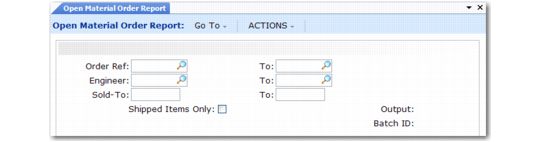
Open Material Order Report (11.11.11)
Select MO lines to report by call ID (order ref), engineer, and sold-to address. The system prints any item on order on any open MO line in the specified range. Line items within the selection print in order of due date.
Material Order Backlog Report
Use the Material Order Backlog Report (11.11.12) to display open MO lines waiting to be shipped. The system lists MO lines by item number, order, due date, site, or any combination. The system lists each item’s availability by site and line items by due date.
Inventory quantities are the same as those in the Stock Availability Inquiry (3.17).
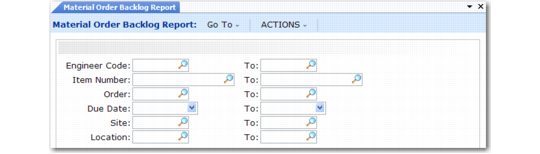
Material Order Backlog Report (11.11.12)
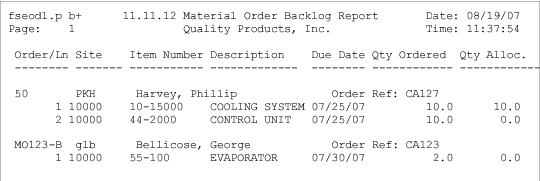
The system prints back-ordered items on an MO line with a due date and site in the specified range. Each line item within the selection prints in order of due date.
Backlog Report (132-column print format)
Material Order Shipment Report
Use the Material Order Shipment Report (11.11.13) to print a report based on the transaction history created whenever an MO is shipped. Use this to view transactions for MOs that have fully shipped and been deleted by the system. If an MO line has partially shipped, the open quantity on the MO line displays.
The report includes the call number for MOs that have not been consumed completely in CAR. Since the system does not maintain the call number in transaction history, it is not available after the MO is consumed and deleted.
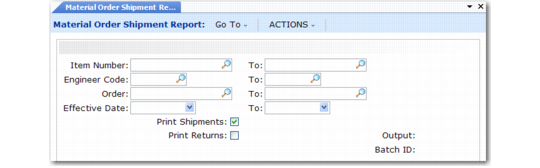
Material Order Shipment Report (11.11.13)
Only MO lines with a quantity shipped appear on the report. You can restrict the report to only items shipped or optionally include information for items returned.
Select MO lines to include by item number, engineer code, MO number, and ship date. Except for engineer, the selection criteria determine the way the system sorts and presents information on the report. The report is sorted by item number, effective date, or MO number, depending on the range you specify, then by the transaction history number. If you specify only the engineer, the system sorts the report by transaction history number.
Important: Generating a report with blank selection criteria or using only the engineer code can impact program performance. Also, because the report searches all transaction history records, a large amount of history can degrade performance.