QAD 2017 Enterprise Edition
>
User Guides
>
Service/Support Management
>
Depot Orders
>
Overview
>
Depot Order Process Flow
Depot Order Process Flow
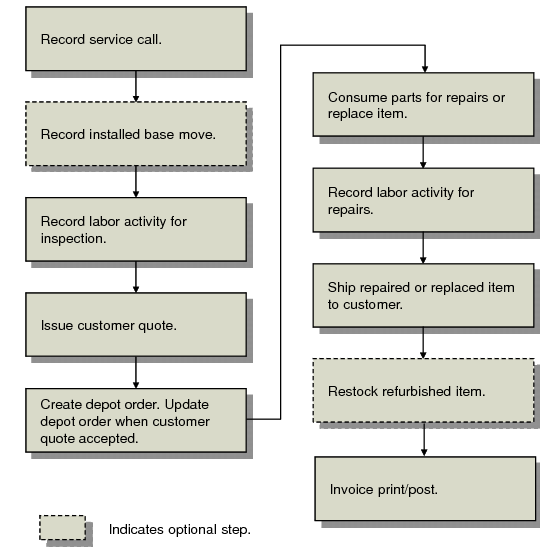
Business Process Flow illustrates an overview of the typical depot order process flow. Use this process flow and the accompanying description to help you process depot orders in your organization.
Business Process Flow
The first step involves the service call being logged using Call Maintenance (11.1.1.1). Optionally, at this point, if the depot order item now belongs to another end user, this can be recorded by using the Installed Base Move frame of Call Maintenance.
Next, the item is received from the customer and inspected to determine whether the item should be replaced or repaired, and associated repair/replacement costs are determined.
Note: The receipt is recorded using Depot Order Maintenance (11.1.2.1) by setting the Receive field to Yes. For details, see
here.
Labor activity for the inspection is recorded using Call Labor Recording (11.1.1.17). The resulting quote is communicated to the customer. The depot order is created using Depot Order Maintenance (11.1.2.1), though the depot order record is not yet confirmed.
Next, if the customer accepts the quote, the status of the depot order in Depot Order Maintenance is manually updated to indicate the customer has confirmed the order.
If the item is being replaced, the item is entered on the depot order as an additional call line and sales order line. The system automatically creates a material order for the item to be shipped and consumed against the call to remove the replacement from inventory.
If the item is being repaired, material for the repair is planned on a parts list and/or a material order. Parts can be preloaded from a BOM and saved as a new BOM for future use.
Next, an engineer records labor activity for repairs by using Call Labor Recording. Any additional items consumed or any items returned (not needed) are recorded as part of the repair in Call Parts Recording (11.1.1.19).
Next, the CSR verifies that the repair work has been completed and updates the depot order to enable invoicing. Optionally at this point the service type may be changed by using the Repair Data frame in Depot Order Maintenance to redirect service costs to different GL accounts based on the work performed and the coverage entitled to the customer. GL transactions are reversed and reposted.
The repaired item is either shipped back to the customer or restocked. If the item is returned to inventory, this is recorded using Depot Item Restock (11.1.2.4). Restocked items are removed from the customer installed base.
Invoicing occurs on the sales order line (which acts as a pending invoice for calls); this may be a zero invoice if a replacement item was sent with pricing attached to its shipment.