Service Routing Maintenance
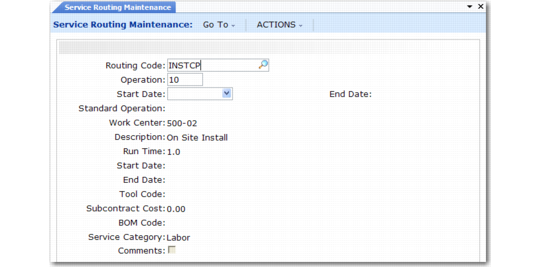
Specify the details for service routings in Service Routing Maintenance (11.19.17), illustrated in
Service Routing Maintenance (11.19.17). A service routing is the sequence of steps involved in a service operation. This sequence can include any number of standard operations, or can use operations defined for this service routing only.
Note: Standard routings cannot be updated with Service Routing Maintenance.
Service routing codes must follow the same rules as service BOMs:
• The routing code must be unique to Service/Support Management.
• It cannot be an existing item number in the item master.
Standard Operations
Standard operations streamline data entry by providing defaults for all but the effective dates (Start Date and End Date). The comments you enter for each step print on the call so that the engineer can see how to service the item. You can use both manufacturing standard operations, which you define in the Routings/Work Center module, and service standard operations on a service routing. If you use manufacturing standard operations, defaults for service-only attributes are not available.
Work Centers
When you set up a service routing, you can use standard work centers that are part of your regular manufacturing operations. Or you can use service work centers that you create in Service Work Center Maintenance (11.19.13). The kind of work centers you use depends on your business procedures.
Note: Work centers are important in Call Activity Recording because the system derives the standard cost of labor from the work center.
The work center is a required field even if you do not use work centers in the traditional manufacturing sense. If you dispatch engineers to do preventive maintenance or repair on site, you can set up a service work center named FIELD, or designate each engineer as a work center.
Service Routing Maintenance (11.19.17)
Routing Code
An 18-character code that identifies the service routing. This cannot be a routing code defined in the Routings/Work Center module or an item number defined in the item master.
Operation
This number identifies where this step occurs in the routing sequence. Operations are usually initially defined in increments of 10, such as 10, 20, 30. This lets you easily insert steps.
Start and End Date
Starting and ending effective dates are inclusive and cannot overlap. You can leave one or both dates blank, which is the default. They indicate the first and last day this operation step is to be effective. Use effective dates to phase in engineering changes.
Standard Operation
You can specify a standard operation code set up with Service Standard Operation Maintenance (11.19.21) or Standard Operation Maintenance (14.9). Standard operations represent actions common to the service of several products or applicable to different service routings in different operation sequences. When specified, most remaining fields default from the values for the standard operation.
Work Center
Defaults from the standard operation, if specified. You can use either service work centers or manufacturing work centers. The work center is important in Call Activity Recording because the system derives the standard cost of labor from it.
Description
Enter a brief description (maximum 24 characters) of the operation. Description defaults from the standard operation, if specified.
Run Time
The approximate number of hours required to perform this step. This field defines the quantity in the Labor/Expenses frame of CAR. Run Time defaults from the standard operation, if specified.
Start and End Date
Starting and ending effective dates are inclusive and cannot overlap. You can leave one or both dates blank, which is the default. They indicate the first and last day this operation step is to be effective. Use effective dates to phase in engineering changes.
Tool Code
The tool associated with this step. Tool Code defaults from the standard operation, if defined. Set up tool codes in Generalized Codes Maintenance for field ro_tool.
Subcontract Cost
Defaults from the standard operation, if specified. Indicate the cost of subcontracting this step. If you specify a run time, leave this field blank. The system does not consider subcontract costs when it generates a call invoice.
BOM Code
Defaults from the standard operation, if specified. BOM Code indicates the list of items to use at this routing step. This code must be a service or manufacturing BOM code. These items are loaded as usage for this step in Call Activity Recording. By default, the system loads all items in the BOM associated with a service item into the first routing step without items.
Note: For more control over how items are loaded in CAR, create service BOMs that include only items used at an operation, then associate the BOM with the correct routing step.
Service Category
Defaults from the standard operation, if specified. The service category for the labor used during this operation. Use the service category to control the financial flow of service activity into GL accounts. Select a labor or expense service category.
Comments
If Yes, enter comments to print on the call. You can use them as detailed instructions for servicing an item.