RMA Life Cycle
Use RMAs for managing simple returns. In general, RMAs perform three activities:
• Receive returned items for repair or replacement.
• Issue replacement items.
• Create invoices for this activity.
RMAs are limited to the receipt and issue of items. Track activities that require an engineer’s intervention with Call Activity Recording (CAR). CAR also supports the exchange of items. However, in CAR, this exchange is part of an engineer’s activity in responding to a call for repair or preventive maintenance.
The following two features distinguish RMA returns from returns in CAR:
• You can generate RMAs independently of call tracking functions.
• RMAs do not require the intervention of a service engineer.
You can view RMAs as a type of sales order with special features to accommodate the requirements of a service environment. RMAs use all sales order features, such as freight processing and best pricing. Best pricing determines applicable prices using codes and rules you defined in the SO/SQ/RMA Issues Pricing Menu (1.10.1).
Note: Best pricing applies only to RMA issues. Define price lists for RMA receipts by setting up credit price lists in the PO/Sched/RMA Rcpt Price Menu (1.10.2).
Since RMAs are similar to sales orders, you use the Sales Orders/Invoices module to manage the invoicing and credit functions. Use Pending Invoice Maintenance to correct pricing information on an RMA invoice just like a sales order invoice.
Note: If you are using shipping groups and inventory movement codes, you can enter shipment information and generate shippers during RMA shipments just like sales order shipments. For more information on shipping, see
QAD Sales User Guide.
RMA Workflow
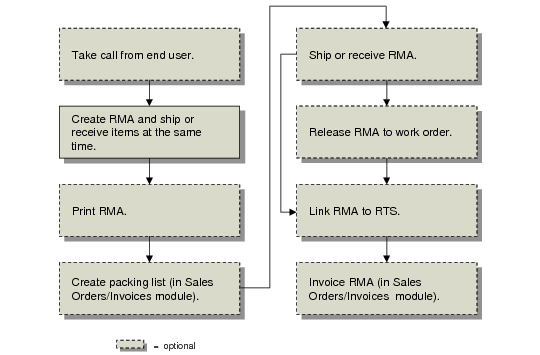
Create RMAs with RMA Maintenance (11.7.1.1). Shipments and receipts on an RMA can take place when you create the RMA, or later in RMA Shipments (11.7.1.16) and RMA Receipts (11.7.1.13). If you create the RMA as unconfirmed, confirm it before shipment using RMA Confirmation (11.7.1.6).
Use RMA Print (11.7.1.3) to print the RMA and use the standard Sales Order Packing List (7.9.13) to create a packing list for an RMA.
Note: In RMA Print, the country for the sold-to customer determines the numeric and date formats. See
Returns to Suppliers for details on RTS features.
If you are going to refurbish the item received on an RMA, release it to a work order using RMA Release to Work Order (11.7.1.5). To send the item to a supplier for repair, associate an RMA with an RTS in RTS Maintenance (11.7.3.1).
RMA billing takes place in the Sales Orders/Invoices module using standard Invoice Post and Print (7.13.4). As with a sales order, you use Pending Invoice Maintenance (7.13.1) to change prices, tax status, and salesperson commission.
Manage credit issues in the Sales Orders/Invoices module. If an RMA is on hold because of a credit problem, you can clear it using Sales Order Auto Credit Approval (7.1.17).
Once fully invoiced, the system deletes RMAs, just like sales orders. To prevent obsolete RMAs from being left in the system, post invoices for an RMA even if monetary amounts are zero.