RMA Charge Types
The RMA charge type addresses an issue arising daily for many service organizations: How can coverage be adjusted for one call or special case?
When this need occurs, you want the ongoing contractual or warranted relationship with the customer to remain unchanged. You need only a one‑time adjustment. For example, the service engineer can make a special charge for an unusual repair. Or, for various reasons, you waive normal charges for this RMA. Using a charge type, you can adjust coverage for this special case without changing the coverage relationship with the customer.
Example: You issue replacement items normally covered 100% by a warranty. However, one item is broken due to misuse by the customer and therefore is not covered under the warranty terms. You need to charge full price for this part. Change the charge type for this item issue to reference a service type that has 0% coverage.
Defining Charge Type/Service Type Relationships
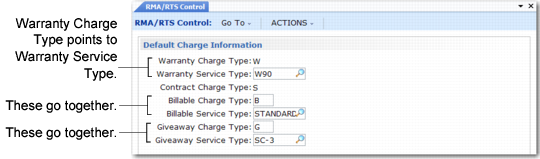
Define RMA charge types in the Default Charge Information frame of RMA/RTS Control (11.7.24), illustrated in
RMA Charge Type Control Settings. The system supports four charge types. You can associate each with a separate service type. The system defines the warranty (W) and contract (S) charge type codes and you cannot change them. Select any other code for the billable and giveaway charge types.
RMA Charge Type Control Settings
RMA Charge Type Control Settings shows three groups of charge/service type relationships:
• Warranty Charge Type and Warranty Service Type
• Billable Charge Type and Billable Service Type
• Giveaway Charge Type and Giveaway Service Type
In
RMA Charge Type Control Settings, a W charge type, which you cannot change, references a warranty service type named W-1. The billable charge type is B and references the billable service type STANDARD. The giveaway charge type is G and associated with the giveaway service type SC-3.
A fourth relationship is not as obvious. The contract charge type, which you cannot change from S, references the Default RMA Contract in the first frame of RMA/RTS Control. When you specify a charge type of S as an override, the system applies the terms of the default RMA contract type.
Charge Type Defaults in RMA Maintenance
When you create an RMA, the header’s service type is either a warranty code or a service contract type. The system uses the terms of the header service type by default for each line item. If the type is a warranty, the charge type for each line item defaults to W (warranty). If the header’s service type is a contract type, the charge type on line items defaults to S (service contract).
Overriding Charge Type Defaults
The default charge type displays during RMA line item entry. You can change it to reference another charge type defined in the control program. Changing the charge type changes the level of coverage for the line item.
If the default charge type for a line item is W, you can change it to reference one of three other service types:
• Specify S to use the default RMA contract type from RMA/RTS Control.
• Specify the billable charge type you defined to bring in the level of coverage of the billable service type from the control program.
• Specify the giveaway charge type you defined to bring in the level of coverage of the giveaway service type from the control program.
In the same way, you can change an S default to W or to the billable or giveaway charge types that you can define.
Changing Charge Types
When you edit an RMA line, you can modify the charge type only if Reprice is Yes in the RMA header or for the line. The level of coverage associated with the service type referenced by a charge type affects pricing for the RMA issue line. If Reprice is No, the charge type pop-up does not display when you modify a line.
Note: Even if Reprice is Yes, you cannot change the charge type if you have shipped a quantity on the line.
Changing the charge type on an RMA line always causes it to reference the service type in the control program.
Example: You specify a contract service type on an RMA header. For the first line, the charge type defaults to S, but you change it to G. The system applies the coverage level of the giveaway charge type to this line item. You edit the item a second time, changing the G to S. The system applies the level of coverage of the default RMA contract type in the control program, not the one on the RMA header.
Coverage and Pricing for RMA Receipts
RMA issues use the price lists, analysis codes, and relationships you define in the SO/SQ/RMA Issues Pricing Menu (1.10.1). The system determines the issue price, without specifying a price list.
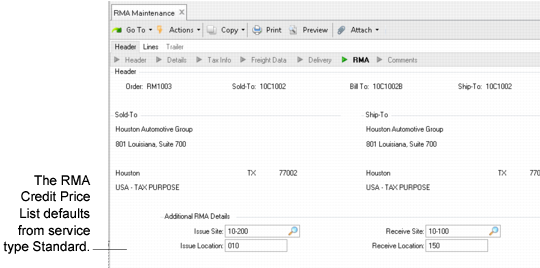
RMA receipts, however, require that you define a specific credit price list in the PO/Sched/RMA Rcpt Price Menu (1.10.2). The credit price list defaults from the service type, but you can modify this when you create an RMA.
Additional RMA Details Pop-Up
In
Additional RMA Details Pop-Up, use the pop-up window in the RMA Maintenance header to specify a credit price list for RMA receipts. The credit price list on the header defaults to each RMA receipt line item. If no credit price list exists, the price for that line item is zero. The RMA receipt looks only at the Credit Price List, not the full item price.
The service type on the RMA header also defines any restocking charge for a receipt line. If you change the service type on RMA header, the new restocking charge takes effect for existing lines only if Reprice is Yes or if you modify the list or net price fields for the receipt line.
The same is true if you change the price list on the RMA header. The change affects existing lines only if Reprice is Yes or if you modify the list or net price fields for the receipt line.