QAD 2017 Enterprise Edition
>
User Guides
>
Service/Support Management
>
Returns to Suppliers
>
Receiving an RTS Transfer from a Vendor
Receiving an RTS Transfer from a Vendor
Use RTS Maintenance for two functions:
• Sending an item needing repair back to the supplier
• Receiving the refurbished item
Two similar frames in RTS Maintenance correspond to these functions: one for sending an item to the supplier and one for receiving an item returned from the supplier. The frame titles in RTS Maintenance indicate which function is being executed.
Receipt from Supplier
The Inventory Receipt field functions like the Inventory Issue field. When you have a matching issue and receipt line on an RTS, you must set Inventory Issue and Inventory Receipt the same for both lines, so they both affect inventory in the same way.
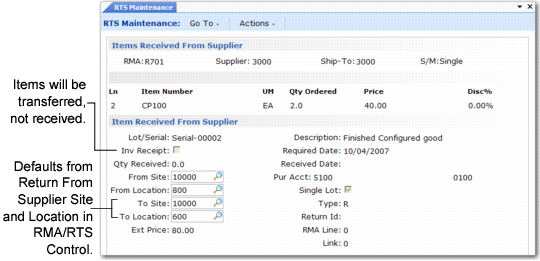
Set Inventory Receipt to Yes to receive the item from the supplier into your inventory. No indicates you are transferring inventory from the At Supplier Site and At Supplier Location to the Return from Supplier Site and Return from Supplier Location defined in RMA/RTS Control. You can change these settings for each line.
In
Receipt from Supplier, Inventory Receipt is No so you can transfer the item. The From Site and From Location default from the At Supplier Site and Location; the To Site and To Location default from the Return From Supplier Site and Location.