QAD 2017 Enterprise Edition
>
User Guides
>
Service/Support Management
>
Returns to Suppliers
>
RTS Maintenance
RTS Maintenance
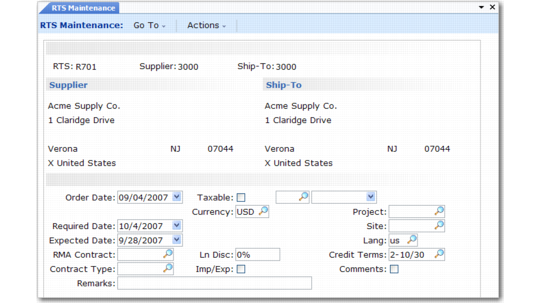
RTS Maintenance (11.7.3.1) illustrates the first two frames of RTS Maintenance (11.7.3.1).
RTS Maintenance (11.7.3.1)
RTS
If you leave this field blank when you create an RTS, the system supplies a number by appending the Purchase Order Prefix in RMA/RTS Control to the value in Next RTS Purchase Order. The system increments this field.
Supplier
Enter a supplier defined in Supplier Create (28.20.1.1) and set up in Supplier Data Maintenance (2.3.1). This is the supplier to whom you are returning items.
Note: Only suppliers set as active in Supplier Create are available for this program.
Ship-To
This defaults from the Supplier record, but you can change to an alternate address.
Order Date
The default is the system date, indicating when you recorded this RTS. This can be the date when you entered the RTS or the date the customer requested an RTS.
Required Date
If left blank, defaults to the order date. This field is the date that the items are required back from the supplier and provides the default date for each RTS receipt line.
Expected Date
If left blank, defaults to the order date. Indicate the date you expect to ship the items to the supplier on this RTS and provides the default date for each RTS issue line.
RMA Contract
If you have linked this RTS to an RMA, you can enter the RMA contract number in this field. This field is for reference only.
Contract Type
If you have linked this RTS to an RMA, you can enter the RMA contract type in this field. This field is for reference only.
Remarks
Any remarks specified for the supplier display by default. You can enter remarks specific to this RTS. Remarks display on printed documents.
Taxable, Class, Effective Date
Default from the values for the Supplier address. These fields indicate whether this RTS is subject to tax. The taxable status for the order header displays as the default for each line item, but you can change it.
Currency
Defaults from the currency for the supplier. When you first create an RTS, you can change this to any currency, but once you move to the next frame, it cannot be changed.
When you specify a foreign currency, a pop-up displays the exchange rate relationship effective on the order date. You can change it or mark this rate as fixed. If the exchange rate is not fixed, the system updates it at later points in the RTS life cycle. If the exchange rate is fixed, the system does not change it.
Ln Disc
Defaults from the supplier. This field indicates the percentage discount usually offered by this supplier.
Import/Export
Defaults from Imp/Exp Default in Intrastat Control and displays if Use Intrastat is Yes in the same control program. Set this field to Yes to enter or maintain import and export data for the order used to create Intrastat History Reports. If Yes, the standard Intrastat frames display for input of appropriate data.
Project
Project code is one component of an account number defined in GL setup functions. Other account components are account, sub-account, and cost center. Each component you enter must be valid on its own and in combination with other account number components. The project on the header is the default for all line items. You can change this for any line.
Site
Must be a valid site code. The system uses the site to determine the default tax environment. Sites for RTS issue and receipt lines default from RMA/RTS Control.
Language
Defaults from the language for the Sold-To address. Use this when printing formal documents as a selection criteria for the print function.
Credit Terms
Defaults from the credit terms for the supplier. Credit terms identify specific types of payment terms, defining the due date and any discounts for early payment.
Comments
Defaults from the RMA Header Comments field in RMA/RTS Control. When Comments is Yes, a frame displays where you can enter comments for this RTS. Enter information that relates to the entire RTS, such as delivery information or credit comments.
Items Returned to Supplier
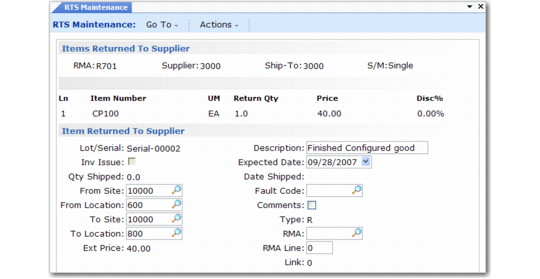
There are two line item entry frames for an RTS: one for items returned to the supplier and one for items received from them. Many fields on this frame are the same as in standard purchase order functions and are not described here.
Items Returned to Supplier (11.7.3.1)
Item Number
Enter the number of an item to be returned to your supplier. The lookup for this field displays all RMA receipt lines with an open quantity that has not already been attached to an RTS return line. These are the items you are most likely to be returning to your supplier.
If you enter a memo item, inventory issue defaults to Yes in the lower frame and you cannot change it.
Price
List price must be specified manually and indicates the amount of credit you expect to receive.
Disc %
Discount percent comes from the supplier in the header and indicates the discount the supplier normally gives you for this returned item.
Inv Issue
Indicate whether to issue inventory from stock or to transfer it to a temporary supplier location when you ship items back to a supplier. If Yes, items are issued from stock and no longer appear on your inventory balance.
If No, the system transfers items to At Supplier Site and At Supplier Location in RMA/RTS Control. When the items are received back from the supplier, the system transfers them from the at-supplier site and location to the Return From Supplier Site and Return From Supplier Location.
Note: When you have a matching issue and receipt line on an RTS, you must set Inv Issue and Inv Receipt the same for both, so they affect inventory the same way.
From Site and Location
These fields default from Customer Return Site and Customer Return Location in RMA/RTS Control. Indicate the site and location where the items to be returned to the supplier currently reside.
To Site and Location
You can edit these fields only if Inventory Issue is No. In this case, the system transfers the items to another site and location for tracking instead of issuing them from inventory. The site and location default from the At Supplier Site and At Supplier Location in RMA/RTS Control.
Type
When Inventory Issue/Receipt is Yes, Type defaults from Memo Order Type in Item-Site Inventory Data Maintenance (1.4.16), if defined for the order line site; otherwise, it defaults from Item Master Maintenance (1.4.1). If Type is blank, the line item is shipped from or received into inventory, recorded in GL, and used by planning.
When Inventory Issue/Receipt is No: The system sets Type to R, indicating an RTS with Inventory Issue/Receipt set to No. For Item Master items, inventory movement still takes place even when Issue/Receive is No. In this case, items are transferred from one site/location to another.
For this reason, the ship type loaded into transaction history is blank, not R, since the transfer affects inventory balances. This ensures accuracy on reports (such as Inventory Valuation as of Date Report, which uses the transaction history to reconstruct the quantity on hand).
Other standard ship types do not apply to RTS shipment/receipts. These include S (subcontract) and B (blanket). Any other type is interpreted as a non-inventory item. Receipts of memo items do not affect inventory, but do debit Purchasing Expenses in general ledger.
This field is validated against values defined in Generalized Codes Maintenance (36.2.13) for field name pod_type.
RMA and RMA Line
If you receive an item from a customer on an RMA and are now returning it to the supplier, enter the RMA and RMA line numbers in these fields for reference. If you select the RMA line item from the lookup on the Item field, the system fills in the RMA number and line. The system verifies that:
• The RMA line exists.
• It is a receipt line, not an issue line.
• The item number matches with an open quantity not already associated with other RTS return lines.
Link
The system maintains this field. It links lines from the receipt portion of the RTS. When an RTS receipt line is linked to the RTS return—or ship—line, its number appears here.
Items Received from Supplier
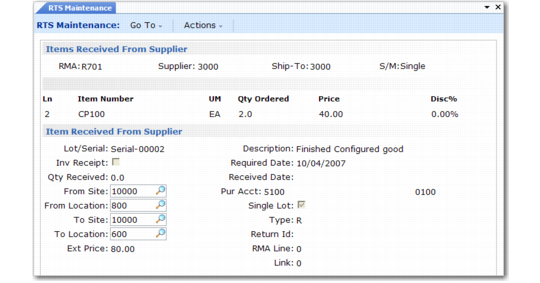
RTS receipts is similar to RTS returns. Again, most fields in the item detail have the same effect as described previously. The differences are described here.
RTS Receipt Lines
Inv Receipt
Indicate if inventory is to be received into stock or transferred from the at-supplier location when you receive items from the supplier.
No: Items are transferred from the At Supplier Site and At Supplier Location in RMA/RTS Control to the Return from Supplier Site and Return From Supplier Location.
Yes: Items are received into stock and appear on your inventory balance.
When you have a matching issue and receipt line on an RTS, you must set Inventory Issue and Inventory Receipt the same for both, so they affect inventory in the same way.
Link
If this receipt is related to a line you issued previously, enter the line number here. The system updates the issue line with this information.
Note: Lines can only be linked if the Inventory Issue/Receipt settings are the same.
RTS Trailer
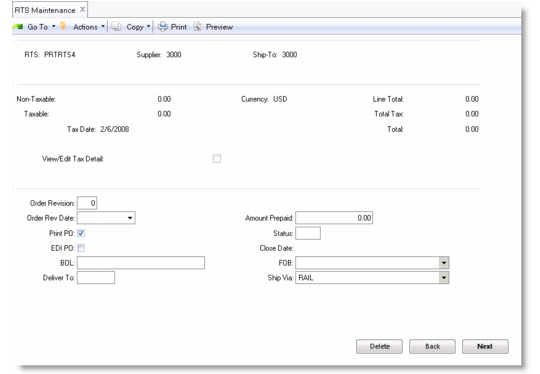
The RTS trailer is similar to a purchase order trailer. It displays charges and credits and other shipping and invoicing information.
RTS Trailer Frames
Some fields on the trailer default from the supplier address such as Ship Via or from Purchasing Control (5.24) and have the same function as in purchase orders. Enter a BOL number, if required, to track RTS shipments.