RTS Picklist
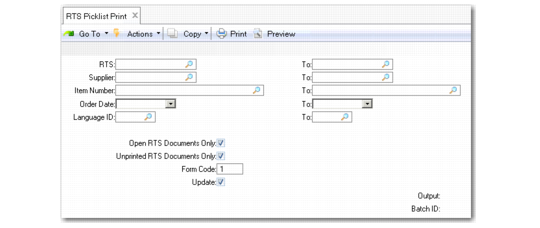
The RTS Picklist Print report (11.7.3.15) enables you to display items due for return to suppliers before picking the items. It lets shipping keep a hard-copy list of what items need to be picked and shipped back to a supplier.
The report is intended for an organization’s internal use and does not contain financial fields, such as prices and tax information.
RTS Picklist Print (11.7.3.15)
RTS (From/To)
Specify the first and last RTS numbers in the range for which to print the report.
Supplier (From/To)
Specify the first and last supplier codes in the range for which you want to print the report.
Item Number (From/To)
Specify the first and last items in the range for which you want to print the report.
Order Date (From/To)
Specify the first and last order dates in the range for which you want to print the report.
Language ID (From/To)
Specify the first and last language ID in the range for which you want to print the report.
Open RTS Documents Only
Set to Yes to print open RTS documents only.
Unprinted RTS Documents Only
Set to Yes to only print RTS documents that have yet to be printed.
Form Code
Specify the form code of the document format on which you want these documents to print. You can customize forms to suit your business needs.
Update
Set Update to No to print a simulated picklist for review without updating the database.