QAD 2017 Enterprise Edition
>
User Guides
>
Service/Support Management
>
Control Programs
>
End User Control
End User Control
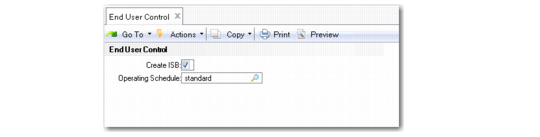
Use End User Control (11.9.24) to determine the default value for the Create ISB field and the default schedule to use for end users.
End User Control (11.9.24)
Create ISB
Sets the default for Create ISB in a new end-user record. The value of Create ISB for an end user determines whether to add items associated with the end user to the installed base.
The system considers two values to determine whether to add an item to the installed base:
• The value of Create ISB for the end user
• The value of Installed Base, specified in Service Item Maintenance, for the item
These both must be Yes before the system adds the item to the installed base. If both these fields are Yes, the Update ISB field defaults to Yes in Call Maintenance, Call Activity Recording, and RMA Maintenance.
If Ship To Installed Base is Yes in Service Management Control, the value of Create ISB in End User Control has a special effect. If the Ship To address on the sales order is not an end user, the system creates an end-user record when it posts the sales order invoice. The system uses the value of Create ISB in the control program to determine whether to add items to the installed base for the new end user.
For an undefined end user, if the item normally goes to the installed base and Create ISB is Yes in the control program, Update Installed Base defaults to Yes in Sales Order Maintenance. You can change this value in a pop-up window if SO Edit ISB Defaults is Yes in Sales Order Control. Otherwise, it takes effect during invoice post and the item is added to the installed base when the end-user record is created.
If you are tracking the installed base, this field gives you more control over how items are added. If you normally add items to the installed base regardless of the end user, set Create ISB to Yes and this value defaults to the functions where you create ISB records. To more tightly control ISB updates so that you can create ISB records only for a predefined set of end users, set this field to No and change the field in End User Data Maintenance.
Operating Schedule
Specify the default schedule to use for end users. You can select one of the schedules defined in End User Master Schedule Maintenance (11.9.13). See
End User Schedules for more information.
Note: If the Operating Schedule field is blank and no schedules are defined in End User Master Schedule Maintenance, the system does not consider end user schedules when scheduling calls.