QAD 2017 Enterprise Edition
>
User Guides
>
Service/Support Management
>
Installed Base
>
End Users
>
End User Schedules
End User Schedules
Setting Up End User Master Schedules
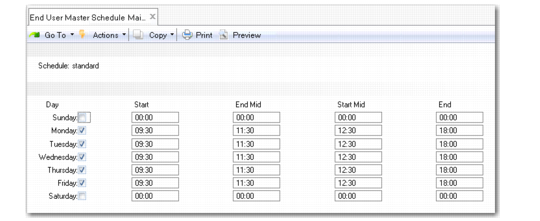
Use End User Master Schedule Maintenance (11.9.13) to set up end user schedules. You can define a schedule to use as a company-wide default, which ensures that engineer visits are scheduled at times that are appropriate for the end user.
You can define a single break in the end user’s daily schedule, such as a lunch break, using the End Mid and Start Mid fields. The system considers the interval between the times defined in the End Mid and Start Mid fields to be non-working time. If you do not define a break, the system assumes that the end user is available all through the working day.
Fields in End User Data Maintenance (11.9.1) enable you to assign a schedule to an end user. You can also modify an existing schedule or create a new schedule for the end user’s needs. See
Creating a Personal Schedule for an End User.
Use End User Control (11.9.24) to set a particular end user master schedule as the company-wide default. If no schedule is assigned to a user in End User Data Maintenance, the end user will follow the default master schedule defined in End User Control. See
End User Control.
End User Master Schedule Maintenance (11.9.13)
Schedule
Enter an eight-character code to identify the end user master schedule.
Day
Select the days for which you want to define an end user schedule.
Start
Enter the start time for the end user’s working day.
End Mid
Enter an end time for the first period of the end user’s day. Use this field to define the start of a non-working period, such as a lunch break. If you do not define a break, the system checks the Lunch Duration field in Engineer Schedule Control (11.13.15.24). If the Lunch Duration field contains a value, the system deducts this value from the total daily time available for scheduling calls. If the Lunch Duration field is also blank, the end user will be available for the entire working day.
Start Mid
Enter a start time for the second period of the end user’s day. Use this field to define the end of a non-working period, such as a lunch break. If you do not define a break, the system checks the Lunch Duration field in Engineer Schedule Control (11.13.15.24). If the Lunch Duration field contains a value, the system deducts this value from the total daily time available for scheduling calls. If the Lunch Duration field is also blank, the end user will be available for the entire working day.
End
Enter the time at which the end user’s working day ends.
Creating a Personal Schedule for an End User
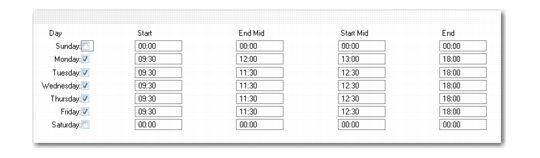
If you assign a master schedule to an end user in End User Data Maintenance, you can edit the schedule using the Edit End User Schedule frame. To open the Edit End User Schedule frame, select the Edit Schedule field in End User Data Maintenance and click Next.
Note: You can also define a personal work schedule for an end user, even if you have not specified a master schedule in End User Data Maintenance. Leave the Operating Schedule field blank, select the Edit Schedule field, and click Next to display the Edit End User Schedule Frame.
Edit End User Schedule Frame
You can edit the fields as described in
Setting Up End User Master Schedules.