QAD 2017 Enterprise Edition
>
User Guides
>
Sales
>
Sales Quotations
>
Creating Sales Quotes
Creating Sales Quotes
Since the quote is an optional first step in the sales order process, you can enter most of the data that the sales order need on a quote. The system copies the data to the sales order when you release the quote.
You create a sales quote by entering data in Sales Quote Maintenance or by copying an existing quote or sales order.
Using Sales Quote Maintenance
The sales quote is similar in layout to the sales order. Multiple frames display when you enter a quote: the header, optional comments, line items and optional comments, and the trailer. See
Creating Sales Orders.
Header Information
Header information applies to the entire quote. Some values default from control program settings and master data, but you can change many of them. The header identifies the customer as well as billing and shipping locations. This section also contains pricing and credit terms information. You do not need to enter dates (Required, Promise, and Due Dates) until you are ready to release the quote to a sales order.
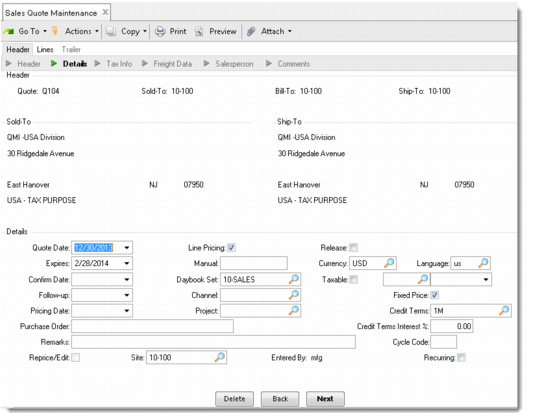
Sales Quote Maintenance Header (7.12.1)
Most of the fields on a sales quote are the same as the corresponding fields in Sales Order Maintenance. See
Creating Sales Orders. Fields that apply especially to quotes are described here.
Expires
Enter the date the quote expires. The system calculates this date by adding the time interval specified in the Days Until Expire field (Sales Quote Control) to the quote date. You can override this date.
Purchase Order
Specify the customer purchase order number, if any. Frequently, the customer knows only their own purchase order number—so a cross-reference on your quote can be useful. If PO Required is Yes for the customer, the quote cannot be released to a sales order unless a purchase order number is specified.
Note: PO Required is defined in Customer Data Maintenance (2.1.1).
Release
Enter Yes or No to indicate whether to create a sales order from this quote. Sales Quote Release to Order (7.12.10) examines this value. Orders are only created for quotes with a Yes in the release field, matching other selection criteria. Typically, this field is set to Yes when the customer accepts the quote. See
Releasing Sales Quotes.
Fixed Price
This field indicates whether the quoted prices are fixed or subject to batch updates due to inflation, commodity repricing, or break quantities. The header value sets the default for each line. Sales Quote Repricing (7.12.18) examines the value of this field to determine whether to adjust a line item price. See
Repricing Sales Quotes.
Unlike most quote fields, the value of Fixed Price on the header is not copied to the order when a quote is released. The system redefaults the appropriate value from Customer Data Maintenance. However, the value established for each quote line is copied.
Cycle Code
If Recurring is Yes, indicate the frequency you plan on releasing sales orders from this quote. Set up values in Generalized Codes Maintenance (36.2.13) for field qo_cycle to standardize input.
Recurring
Enter Yes to allow a quote to be used for a sales order more than once. If the quote is reused on a regular basis, you can enter a cycle code. Recurring quotes can also be used for recurring deliveries or blanket customer orders. Quotes are not considered by MRP.
Last Sales Order and Release Count
Used for recurring quotes only. Last Sales Order displays the number of the last sales order released from this recurring quote. Release Count displays how many times this quote has been released to sales orders.
Reason Lost
You can use this field to track sales quotes that did not become sales orders. Predefine codes with Reason Codes Maintenance (36.2.17). The Sales Quote Reason Lost Report (7.12.17) lists quotes by reason lost codes. You can also enter a reason lost code by line item.
Line Item Section
A quote contains one or more lines. Each line includes the item number, quantity quoted, and unit of measure. If the item number is your customer’s number, the system displays your internal item number, referenced from Customer Item Maintenance. Both numbers print on all sales quote documents.
If you are creating a quote for an item that has one of the item replacement types defined for it and the entry is on or past the item replacement’s effective date, you are either prompted to confirm or select the item replacement. See
QAD Master Data User Guide.You can enter line items in single- or multiple-line mode—the default is specified in Sales Quote Control. More fields are available for updating in single-line mode, such as Due Date and Qty to Release, but multiple-line entry is quicker. You can switch between the two within a quote.
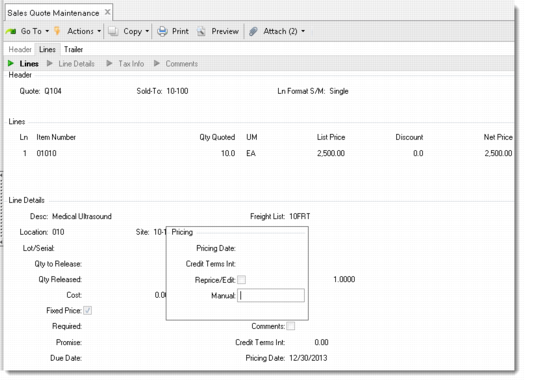
Sales Quote Maintenance Line Items (7.12.1)
Most of the quote line values default from the header and can be updated on each line item. These fields are used in the similar way with sales orders. Fields specific to quotes are described here:
Location
Enter the location where the sales quote line item is stored in inventory.
You can leave Location blank during line-item entry. After the quote is released to a sales order, the system determines an inventory location during allocation or when the packing list is printed.
Location defaults from Item-Site Inventory Data Maintenance (1.4.16) for the quote line site; if a site-specific record does not exist; location defaults from Item Master Maintenance (1.4.1).
Note: If it is a consigned order or the reserved locations have been defined for the sold-to, ship-to, or bill-to customer on this order, different defaulting logic is used.
• If it is a consigned order, location defaults from Ship-To/Item Controls Maintenance (7.18.1).
• If a reserved-location record is found with Primary set to Yes, this location displays by default.
• If reserved locations are defined for one of the sales quote address records but none is designated as primary, the first reserved location found alphabetically within the site displays by default.
Qty to Release
Determines the Qty Ordered field on the sales order line created from the quote. This field defaults from the Qty Quoted. For recurring quotes, the release quantity is less than the quote quantity. It represents the quantity to release each cycle: For example, if the quote is for 12 months of support billed monthly, enter a quote quantity of 12 and a quantity to release of 1.
The line item quantity refers to the quote as a whole. But since multiple sales orders can be made from one quote, Qty to Release and Qty Released indicate the quantity on a single sales order and the released quantity on all sales orders generated from this quote.
Qty Released
The system updates this field automatically each time a quote is released. It indicates how much has been released on all sales order lines generated from this quote.
Trailer Section
Once all line items are entered, trailer information displays. Line items are totaled, and taxes, optional order discounts, and freight charges are calculated. Add any miscellaneous charges here. The fields on the trailer are similar to the fields on the sales order trailer. The value of Print Quote defaults from Sales Quote Control. See
Sales Orders/Invoices for details.
The display of tax information in the trailer is set up in Global Tax Management Control. See
QAD Global Tax Management User Guide for information on setting up GTM.