Using Container Functions
When container and line charges are enabled, additional features are enabled in Container Workbench (7.7.1) and SO Container Maintenance (7.7.5).
Calculating Container Charges
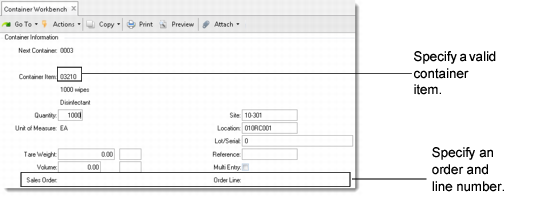
First, you must specify a valid container item, defined in Container Item Maintenance (7.22.10).
You can also specify a sales order and order line in the Container Information frame. The system then tries to match container information with the sales order line. It retrieves the charge type if the container item specified in the workbench matches the primary or an alternate container item associated with the order line. If no match is found, the system looks for a charge type in Ship-To/Container Charge Maintenance or Container Item Maintenance.
If defined, the ship-to/container price is used. Otherwise, the item master price is used.
Container Charge Fields in Container Workbench (7.7.1) illustrates Container Workbench. SO Container Maintenance is very similar.
Container Charge Fields in Container Workbench (7.7.1)
Entering Line Charges
The Additional Line Charges frame displays if Edit Line Charges on Shipper is Yes in either Ship-To Control Maintenance or Container/Line Charges Control. You can add, delete, or modify line charges when building the container.
This frame is exactly the same as the one that displays in Sales Order Maintenance, except that the system assumes that the charge is one time only and does not prompt for this value.