Define Document Formats
Some countries, such as Italy, require the use of specific documents and document formats when shipping goods. Use Document Format Maintenance (2.18.13) in the Shipping Group/Document menu to define and create documents to conform with local requirements. Use Document Format Browse (2.18.14) to search for and display information relative to defined document formats.
Document formats for shippers and master bills of lading can be created. The format you assign to your document identifies any special processing and printing requirements.
A document format is assigned a form code to specify form layout and to identify a service-encapsulation procedure. This procedure identifies a set of services that perform additional processing tasks required for printing documents.
See
Creating Custom Shippers for details on creating custom print formats.
Example: A procedure can gather additional data to appear on the printed document and check that the document includes all necessary information and is ready to print.
A default document format is set in Container/Shipper Control (7.9.24) and Customer Schedules Control (7.3.24). The default format is used for shippers without inventory movement codes or with no available shipping group, and for master bills of lading. It can also be assigned to inventory movement codes within shipping groups.
You can print shippers or master bills of lading based on a range of document formats. If you have a series of compatible document formats, set up their codes sequentially for efficient printing.
Example: You have three document formats that print on the same form. If you name them FMT001, FMT002, and FMT003, you can load the appropriate form in the printer and print only documents with format codes from FMT001 through FMT003. If you have a number of document formats that print on blank paper, set them up in the same way.
Use Master Comment Maintenance (2.1.12) to create master comments associated with a document format by entering the format code in the Master Reference field. You can copy master comments to shipper headers, line items, or trailers when creating or maintaining a shipper using Pre-Shipper/Shipper Workbench (7.9.2). To differentiate between header, line item, and trailer comments, use the Comment Type field.
Note: If a document format is used by any shipment or shipping group, it cannot be deleted.
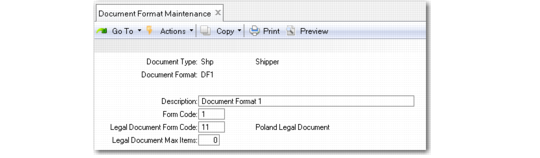
Document Format Maintenance (2.18.13)
Specify the document format characteristics you want to create or modify by entering appropriate values in the following fields:
Document Type
Enter the type of document to which the format applies. Possible values are:
• SHP for shippers
• MB for master bills of lading
Document Format
Enter a new or existing document format code of up to eight alphanumeric characters. This field cannot be blank.
Description
Enter up to 30 characters describing this document format. The description displays on browses and reports.
Form Code
Enter a code (up to two characters) identifying the requirements for processing and printing documents of this format. This field is required. The default is 1.
Note: The Legal Document Form Code and Legal Document Max Items fields are specific to legal document implementation. For information on these two fields, see
Defining Legal Document Formats.