Menu | Program | Description |
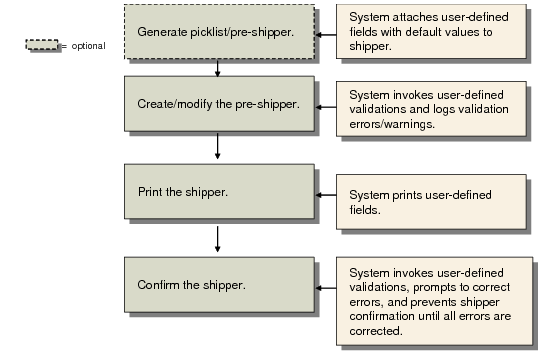
7.9.2 | Pre-Shipper/ Shipper Workbench | The system validates system fields in the following: • Second header frame • Multi Carrier frame • Shipper Print frame The User Field frame can display in the workbench; see User Fields Frame. The Data Correction frame can display to correct user field data. When a pre-shipper is converted to a shipper, the system validates all shipper data using the validations you set up in Rule Definition Maintenance. The system records validation errors for the shipper. If you convert a pre-shipper to a shipper, the system maintains the error log for the shipper, not the pre-shipper. If you cancel the shipper, the system deletes the error log for the canceled shipper. |
7.9.4 | Pre-Shipper/ Shipper | When you convert a pre-shipper to a shipper, the system validates fields you specified to be validated for the new shipper and logs errors. |
7.9.5 | Pre-Shipper/ Shipper Confirm | User and system fields are validated in the second frame. The User Field frame can display while confirming the shipper; see User Fields Frame. The Data Correction frame can display to correct user field data. If a shipper has validation errors, you cannot confirm the shipper; if the shipper has warnings, you can confirm the shipper. At confirmation, the system validates user fields and system fields stored in the database that are enabled for validation. Note: You can manually validate screen variable fields—fields not stored in the database—when creating a shipper; however, during confirmation, the system does not validate screen variable fields. When you convert a pre-shipper to a shipper, the system runs shipper validations again. |
7.9.7 | Pre-Shipper/ Shipper Auto Confirm | The system runs the final confirm validation against the shipper by re-validating all fields set for validation at shipper create and pre-shipper/shipper confirm. If errors occur, the confirm does not occur. Pre-Shipper Auto Confirm displays a report that indicates which shippers failed confirmation due to validation errors. The system validates again when you convert pre-shipper to shipper. |
7.9.8 | SO Shipper Maintenance and other non-workbench shipper-creation programs | Only shippers are modified in this program. User Field pop-up window can display in frames; see User Fields Frame. Also, Data correction frame displays to correct user field. The system logs errors in the database. |
7.9.10 | Manual Shipper Validation | This program runs validations for the shipper, records errors in the database, and displays validation failure or success. See Using Manual Shipper Validation. |
7.9.20 | Undo Shipper Number Assignment | If the user performs an undo on the shipper number assignment, the system validates fields you specified to be validated for the restored pre-shipper. The system deletes the error log for the canceled shipper. |
7.9.21 | Unconfirm Shipper | The system does not validate fields during processing. |
7.9.22 | Shipper Gateway | The system validates shippers loaded into the system using this gateway. The system logs errors in the database, but still creates the shipper. When loading a shipper via the gateway, the system validates any fields set to be validated at shipper create. The system prints validation errors on the gateway output report. |
7.9.23 | Shipper Delete /Archive | The system deletes and archives the error log associated with a shipper. |
Trade Sales and EMT Shippers | The system generates shippers even when validation errors occur during trade sales or Enterprise Material Transfer (EMT) processing. The system prevents shipper confirmation when validation errors occur during shipper confirmation. Shipper confirmation validation errors do not cause trade sales/EMT to fail or return to a processing state that is prior to shipper confirm. |