Linking Rules to Profiles
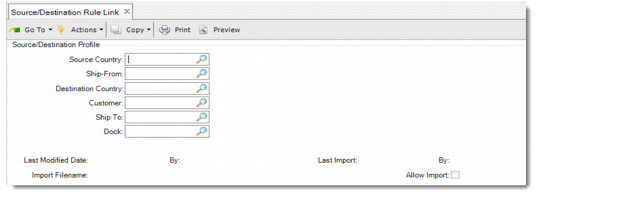
Use Source/Destination Rule Link (7.9.11.5) to set up source and destination address combinations and link existing rules to the combinations. Ensure that you link a rule to the profile. Otherwise, you cannot create the profile.
Creating a Source or Destination Profile
To validate data, you must provide the source and destination criteria upon which the system bases the validation. The source criteria are from the following source fields in Source/Destination Rule Link:
• Source country
• Ship-from
The destination criteria are from the following destination fields in Source/Destination Rule Link:
• Destination country
• Customer
• Ship-to
• Dock
Linking Rules to Field Values
Use Source/Destination Rule Link (7.9.11.5) to link source/destination profiles to specific rules. Specify source/destination values for the fields; then indicate the rule you want to link to the source and destination field values.
Example: You create three rules to validate user and system fields for shippers sent from ship-from code 100 in the USA to Mexico.
• Rule 1: USA shipping validations
• Rule 2: Ship-from code 100 shipping validations
• Rule 3: Mexico shipping validations
You want the system to apply the rules as follows:
• Rule 1 applies when you ship from anywhere in the USA to anywhere in the world.
• Rule 1 and 2 apply when you ship from USA/ship-from code 100 to anywhere in the world.
• Rule 1, 2, and 3 apply when you ship from USA/ship-from code 100 to Mexico.
To do this, define three source/destination combinations:
|
Field to Set
|
Set 1
|
Set 2
|
Set 3
|
|
Source Country
|
USA
|
USA
|
USA
|
|
Ship From
|
blank
|
100
|
100
|
|
Destination
Country
|
blank
|
blank
|
Mexico
|
You then link the rules to the hierarchy set as follows:
• Link Set 1 to Rule 1
• Link Set 2 to Rule 2
• Link Set 3 to Rule 3
Now, any time a shipper is sent from:
• USA to anywhere, Rule 1 executes against the shipper.
• USA, Ship-From 100, Rules 1 and 2 execute against the shipper.
• USA/Ship-From 100 to Mexico, Rules 1, 2 and 3 execute against the shipper.
Source/Destination Rule Link
The following describes fields in Source/Destination Rule Link.
Source/Destination Rule Link (7.9.11.5)
Source Country
Enter the country code for the source profile to link to a rule.
Ship-from
Enter the ship-from code for the source profile to link to a rule. You define ship-from codes in Site Maintenance (1.1.13.1).
Destination Country
Enter the country code for the destination profile to link to a rule. The system populates this field when you enter a ship-to code or dock as part of the profile.
Customer
Enter the customer code for the destination profile to link to a rule. The system populates this field when you enter a ship-to code or dock as part of the profile. You define customer codes in Customer Create (27.20.1.1).
Ship-to
Enter the customer ship-to code for the destination profile to link to a rule. The system populates this field when you enter a dock as part of the profile. Also, if you enter a ship-to, the system populates the Customer and Destination Country fields. You define customer ship-to codes in Customer Ship-to Create (27.20.2.1).
Dock
Enter the dock code for the destination profile to link to a rule. The system populates the Ship-To, Customer, and Destination fields when you enter a dock as part of the profile. You define dock codes in Dock Maintenance (7.3.6).
Last Modified Date/By
These display-only fields show the date the rule was last modified and the user who modified it.
Last Import/By
These display-only fields show the date the rule was last imported from exported centrally managed rules and by whom. For information on centralized management of rules, see
Centralized Management of Validation Data.
Allow Import
Indicate whether system administrators can import rules that were exported from a centrally managed site. For information on centralized management of rules, see
Centralized Management of Validation Data.