Creating and Entering Reason Codes
Reason codes provide a quick way to note special requirements or other predefined comments related to shipments. You can associate time and quantity-based reason codes with any monitored shipment or performance transaction record.
Use Reason Codes Maintenance (36.2.17) to create reason codes for shipment performance history.
• Use shipqty as the reason type for quantity-based reason codes.
• Use shiptime as the reason type for time-based reason codes.
Enter reason codes prior to making a shipment or assign them to a performance transaction record after a shipment has been completed.
• When using shippers, assign reason codes while adding or modifying shipper lines in Pre-Shipper/Shipper Workbench (7.9.2). This feature is controlled by the setting Enter Reason Codes in Workbench to Yes in Shipment Performance Control.
• Use Shipment Reason Code Entry (7.9.17.9) to enter shipment performance reason codes for shipments that have been processed and do not have reason codes associated with them.
• Use Shipment Performance Data Maintenance (7.9.17.13) to assign reason codes or change previously assigned codes for any performance transaction record.
Entering Reason Codes in Pre-Shipper/Shipper Workbench
To enter reason codes in Pre-Shipper/Shipper Workbench (7.9.2), Enter Reason Codes in Workbench must be Yes in Shipment Performance Control (7.9.17.24). When you add a shipper line or modify an existing shipper line in the workbench, you can then use the Shipment Performance Data frame to enter reason codes and comments.
Pre-Shipper/Shipper Workbench (7.9.2), Shipment Performance Data
Assigning Reason Codes to Performance Transaction Records
Use Shipment Reason Code Entry (7.9.17.9) to assign reason codes to performance transaction records. Transactions previously assigned reason codes cannot be modified with this program.
Note: Use the Missing Reason Code Report (7.9.17.10) to review shipment performance transactions without associated reason codes.
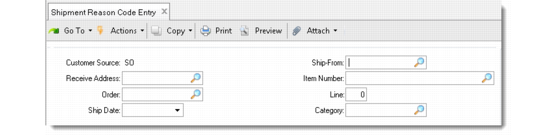
This maintenance function has three frames: header, Shipment Details, and Reason Codes. Specify data to identify shipments in the header frame.
Shipment Reason Code Entry (7.9.17.9)
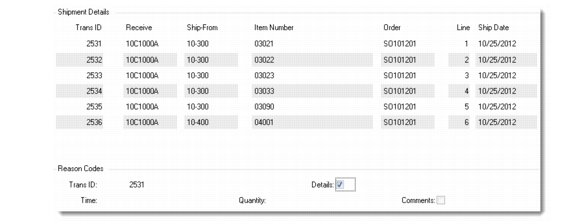
The Shipment Details frame displays transaction detail records that match the header selection criteria. Select a shipment transaction ID for assigning reason codes and updating comments.
Shipment Details and Reason Codes Frames
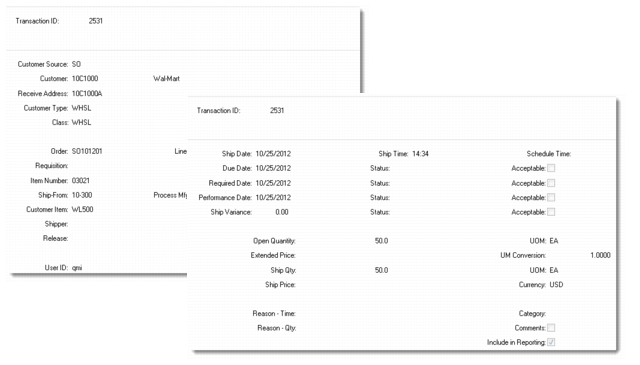
In the Reason Codes frame, set Details to Yes to see all details associated with the transaction ID you selected. After the detail frames display, enter reason codes and any associated comments.
Transaction Record Detail Frames illustrates the transaction detail frames.
Transaction Record Detail Frames