Establishing Performance with Status Codes
When the system processes shipments, it automatically assigns status codes in the following programs:
• Pre-Shipper/Shipper Confirm (7.9.5)
• Sales Order Shipments (7.9.15)
• Pending Invoice Maintenance (7.13.1)
• Material Order Maintenance (10.7.1)
• Material Order Shipments (10.7.6)
• RMA Maintenance (11.7.1.1)
• RMA Shipments (11.7.1.16)
• Material Order Maintenance (11.11.1)
• Material Order Shipments (11.11.6)
• Distribution Order Processing (12.17.21)
• Distribution Order Shipments (12.17.22)
The system is designed to capture two types of status codes: one based on ship time and one based on shipment quantity.
The following subsections tell you how to plan and create time- and quantity-based status codes.
Planning Time-Based Status Codes
When defining time-based status codes, you should establish a baseline first. Once you establish a status code baseline, you can define status codes for combinations of specific elements of a shipment, thereby setting up a tiered approach to monitoring performance.
You establish a status code baseline by selecting codes to represent the minimum and maximum amount of time that a shipment can be late or early.
You can begin by selecting a code for an on-time delivery. Then, you can select a code to indicate one day late, two days late, and so on, and conversely, codes to represent one day early, two days early, and so on.
In your baseline, you should define the minimum and maximum days that a shipment must be late or early before the system applies the code to a shipment. Although days were used here, you can use either days or hours to define your codes.
Use
Time-Based Status Code Baseline Example as a guide to creating a time-based status code baseline for your system.
Time-Based Status Code Baseline Example
|
Status Code
|
Status Code Description
|
Minimum Early
|
Maximum Early
|
Minimum Late
|
Maximum Late
|
|
01
|
On time
|
0
|
0
|
0
|
0
|
|
02
|
1 day late
|
|
|
1
|
1
|
|
03
|
1 day early
|
–1
|
–1
|
|
|
|
04
|
2 days late
|
|
|
2
|
2
|
|
05
|
2 days early
|
–2
|
–2
|
|
|
|
06
|
More than 2 days late
|
|
|
3
|
999
|
|
07
|
More than 2 days early
|
–999
|
–3
|
|
|
In your baseline, create status codes that cover all shipment situations. For example, even if you do not normally make shipments more than five days late, you should create a status code to address that possibility. For this status code, the minimum late value would be 5. The maximum late value would be 999. The system assigns this status code to all shipments made more than five days late.
If you do not create contingency status codes and the system encounters a shipment where none of the available status codes apply, the performance transaction record is created with a blank status code. Use Shipment Performance Data Maintenance (7.9.17.13) to add status codes to these transaction records.
Once you establish a baseline, you can specify codes for unique combinations of shipment areas, like a specific customer or item, so that you can monitor performance trends. Setting up these types of status codes lets you build a tiered approach to monitoring.
Example Tiered Approach presents an example of tiered shipment performance monitoring with status codes.
Example Tiered Approach
|
Code
|
Specifies...
|
Monitors...
|
|
010
|
Ship-From 1000, Customer A, Item AB-100
|
This specific combination
|
|
011
|
Ship-From 1000, Item AB-100
|
Shipments of Item AB-100 to any customer
|
|
012
|
Ship-From 1000, Customer A
|
Shipments of everything to Customer A
|
|
013
|
Ship-From 2000
|
Shipments from site 2000
|
|
014
|
<Blank>
|
All shipments
|
Based on the example data
Example Tiered Approach:
• When a shipment of AB-100 is sent from 1000 to Customer A, the system applies code 010. This is the most specific code.
• When a shipment of YY-250 is sent from 2000 to Customer B, the system uses status code 013.
Creating Time-Based Status Codes
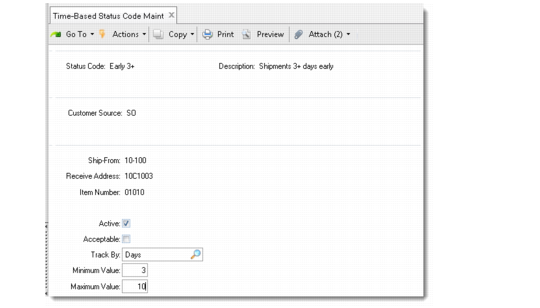
Use Time-Based Status Code Maintenance (7.9.17.3) to create and maintain the status codes that measure shipment timeliness. Use Time-Based Status Code Browse (7.9.17.4) to review time-based status codes in your system.
Time-Based Status Code Maintenance (7.9.17.3)
Status Code
Enter a code (up to 8 alphanumeric characters).
Note: Status codes must be unique for a customer source. For example, you can create a DO status code 010 and an SO status code 010, but you cannot have two SO status codes 020.
Description
Enter a brief description (up to 16 alphanumeric characters) of this status code.
Do not leave this field blank. Most shipment performance reports display the status code description, not the status code name.
Customer Source, Ship-From, Receive Address, Item Number
Enter values for these four fields. The status code is applied only for shipments that match these values. See
Defining Control Program Exceptions.
Active
Indicate whether this status code is active. Only active status codes are assigned by shipment performance functions.
Inactive status codes are maintained in the system and can be activated for use at any time by setting this value to Yes.
Status codes can be deleted at any time, but you should consider setting Active to No instead. If you delete a status code, make sure you create a new status code or that another active status code is available to take its place. If you delete status codes without providing new status codes for similar shipment situations, the system may create transaction records with blank status codes for those shipments.
Acceptable
Indicate whether shipments assigned this status code are considered shipped on time.
Yes: This code indicates an on-time status.
No: This code indicates an exception status, such as late or early.
Shipments assigned an acceptable status code always appear on shipment performance reports unless the Show Exceptions Only field is Yes. In this case, only shipments with exception status codes are reported.
Track By
Enter Days or Hours to indicate status codes based on hour or day measurements.
The value you specify determines the unit of measure for Minimum and Maximum fields.
Minimum
Enter the minimum number of hours or days a shipment can be early or late to be assigned this status code. This value must be the same or less than the value entered in Maximum.
If you specified Hours in Track By, the values in Minimum and Maximum represent hours. If you specified Days, the values represent days.
To designate an early status code, use negative numbers. To designate a late status code, use positive numbers.
Example: To designate a status code for shipments between 5 and 10 days early, enter –10 in Minimum and –5 in Maximum. To designate a code for shipments between 5 and 10 days late, enter 5 in Minimum, and 10 in Maximum.
When the number of hours or days a shipment is early or late falls within the range specified for the status code, the system assigns this status to that shipment.
When Track By is days, beginning and ending ranges associated with status codes cannot overlap. When Track By is hours, the beginning or ending range for one status code can overlap with another.
Example: Status code ST1 has 4 as the minimum and 6 as the maximum. Status code ST2 has 6 as the minimum and 8 as the maximum. The ending of the hour range for ST1 and the beginning of the hour range for status code ST2 is 6. A shipment that is 6 hours late is assigned code ST1. A shipment that is 6.5 hours late is assigned code ST2.
Maximum
Enter the maximum number of hours or days a shipment can be early or late to be assigned this status code. This value must be the same or greater than the value in Minimum.
Assigning Time-Based Status Codes
Once status codes are created, the system uses criteria to locate any applicable status codes before assigning them to shipment transactions. The system searches key values from most specific to least specific, using the same order used for performance control records.
When the system assigns time-based status codes for a discrete order, it compares the shipment date to the due date, performance date, and required date on the order line. Based on the comparisons, the system assigns the corresponding time-based status codes to the shipment. It can assign the same or different status codes for each date. For example, if the performance and due dates are not the same, the system may assign different status codes based on those dates.
Note: If an order is missing the ship date, the current system date is used. If the due, required, or performance date is missing, the ship date is used.
When the system assigns time-based status codes for a scheduled order, it first reviews whether the scheduled order specifies a scheduled ship time. If one is specified, the system finds the most appropriate time-based status code based on hours.
If an applicable hour-defined status code is not available, the system uses available day-defined status codes to evaluate the shipment. If no scheduled ship time is specified, the system compares the shipment date to the schedule date to find the correct status code.
Planning Quantity-Based Status Codes
You should plan quantity-based status codes just as you planned the time-based status codes. Quantity-based status codes are defined exactly as time-based status codes, but are based on the amount or percentage a shipment is under or over the planned shipment quantity.
You should establish a baseline for the quantity-based status codes. You can begin with a code for a planned shipment; then assign codes for shipments that are percentages (or a certain quantity) over or short of the planned shipment.
For example, 00 can be a planned shipment, while 01 indicates 10% over, 02 indicates 20% over, and so on. You can use negative numbers to establish a baseline for shipments that are a certain percentage or quantity under a complete shipment. Plan for contingency status codes, also.
You can combine codes of varying percentages or quantities with other criteria such as ship-from, receive address, or items to create a tiered approach to monitoring your shipments.
Creating Quantity-Based Status Codes
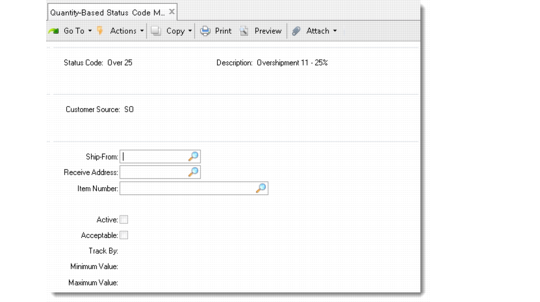
Use Quantity-Based Status Code Maintenance (7.9.17.6) to create and maintain status codes that measure shipment completeness. Use Quantity-Based Status Code Browse (7.9.17.7) to review quantity-based status codes in your system.
Similar rules apply to creating quantity-based status codes as time-based status codes. Use the same key values to assign status codes for specific shipping situations.
You create quantity-based exception status codes by setting Acceptable to No.
You indicate how the system should measure shipment completeness by entering Number or Percent in the Track By field. Shipment percent is calculated as the actual shipment quantity, divided by the required ship quantity.
When Track By is set to Number, beginning and ending ranges associated with status codes cannot overlap. When Track By is set to Percent, the beginning or ending range for one status code can overlap with another.
The Minimum and Maximum field range indicates an overshipped and undershipped quantity or percentage range for each status code. To designate an undershipment status code, use negative numbers. To designate an overshipment status code, use positive numbers.
Example: To designate a status code for shipments between 5 and 10 percent under the open ship quantity, enter –10 in Minimum and –5 in Maximum. To designate a code for shipments between 5 and 10 percent over the open ship quantity, enter 5 in Minimum, and 10 in Maximum.
Quantity-Based Status Code Maintenance (7.9.17.6)
Applying Quantity-Based Status Codes
When the system assigns quantity-based status codes to an order, it compares the quantity being shipped to the open quantity on the order to determine how much of the open quantity has been satisfied. The system also calculates the percentage of the open quantity shipped.
As the system reviews the possible status codes, it checks to see if the codes are based on the actual ship quantity or a percentage of the open quantity for an order line. If the code is based on the actual ship quantity, the quantity shipped is used to locate the correct status code record. If the code is based on a percentage, the percentage of the open quantity shipped is used to locate the correct status code.
Once the correct code is found, the system assigns it to the performance transaction record.
Quantity-based status codes are assigned based on the open quantity at the time of shipment. This is true even when partial shipments occurred previously and the open quantity is no longer the original order quantity. When the shipment quantity is over or under the open shipment quantity by a percentage that falls within the specified range for a status code, the system assigns that status code to the shipment.