Defining Control Program Exceptions
Use Performance Controls Maintenance (7.9.17.1) to create control records that override general settings in Shipment Performance Control. The detailed control records are used to collect performance data for unique key combinations of customer source, ship-from, receive address, and item number.
• Customer source refers to where the order originates. There are two types of customer source: distribution orders (DO) or sales type orders (SO). Sales type orders include sales orders, scheduled orders, RMA shipments, and material orders.
• Ship-from site is the site where the shipment originates.
• Receive address values depend on the customer source you enter. If you select DO, then define the control record with a receiving site. If you select SO, then define the control record with a customer receive address.
• Item number refers to the item being shipped.
Only one control record definition can have the same combination of key values. When more than one control record might apply during shipment, the system uses the most specific record for the appropriate customer source. Records are chosen from most to least specific in the sequence listed in
Search Order for Control Records.
Search Order for Control Records
|
Order
|
Ship-From
|
Receive Address
|
Item
|
|
1
|
|
|
|
|
2
|
|
|
|
|
3
|
|
|
|
|
4
|
|
|
|
|
5
|
|
|
|
|
6
|
|
|
|
|
7
|
|
|
|
|
8
|
|
|
|
Transit Lead Time
When the source is SO, you can enter a transit lead time for a shipment in Performance Controls Maintenance (7.9.17.1). You specify the number of days it takes for a shipment to reach the end customer from the time it leaves your dock in the Transit Lead Time field.
Note: Transit lead time does not apply when source is DO.
Transit lead time differs from the shipping lead time you specify in Sales Order Control (7.1.24). Shipping lead time is added to the order due date to account for the number of days it takes to prepare an order for shipment. Transit lead time is the number of days it takes a shipment to travel to a customer.
The transit lead time that you enter in Shipment Performance is not associated with the time that you enter in Delivery Transit Time Maintenance (2.16.1). Delivery transit time is used in automatic date calculations on order lines when the Calculate Promise Date field is set to Yes in Sales Order Control (7.1.24).
The transit lead time in Shipment Performance is used to assign status codes for the required delivery dates and performance dates specified when shipping discrete sales orders. The system uses the value you enter in Shipment Performance to determine if a shipment arrives at a customer site on time. This supports more accurate shipment performance calculations related to performance and required dates.
Defining Control Program Exceptions for a Sales Order
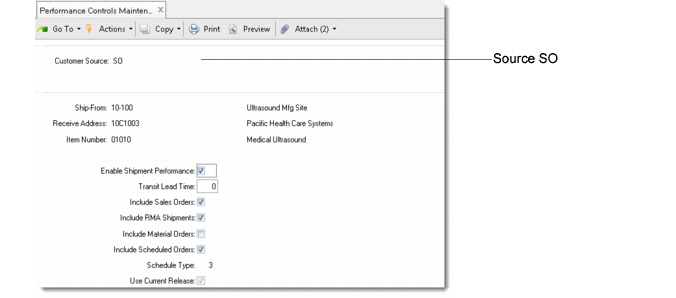
The appearance of Performance Controls Maintenance varies, depending on the order source. When the source is SO, you can specify the following for each control record:
• Enable or disable shipment performance monitoring.
• Specify shipment transit time.
• Indicate types of sales orders to monitor or not monitor.
• Change the schedule type being used for scheduled order calculations.
• Indicate whether to use the current or previous schedule to determine shipment performance.
SO Source in Performance Controls Maintenance (7.9.17.1)
Enable Shipment Performance
Enter Yes to collect performance data for the specified combination of customer source, ship-from site, receiving address, and item number. Enter No if you do not want performance data for this key combination.
Transit Lead Time
Optionally enter the number of days it normally takes a shipment to reach the receive address after that shipment leaves your dock.
Leave the default 0 (zero) to indicate that transit time should not be considered.
Select the types of orders (sales, RMA shipments, material, and scheduled) you want to track for this control record. If you select scheduled orders, enter values for the Schedule Type and Use Current Release, which default from Shipment Performance Control. See
here.
Defining Control Program Exceptions for a Distribution Order
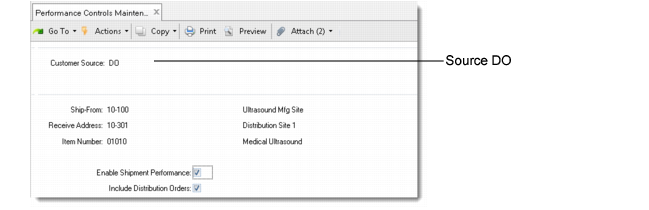
When the source is DO, the Performance Controls Maintenance screen appears differently than when the source is SO. For a DO source, you can specify the following for each control record:
• Enable or disable shipment performance monitoring.
• Indicate whether to include distribution orders in shipment monitoring.
DO Source in Performance Controls Maintenance (7.9.17.1)
Enable Shipment Performance
Enter Yes to collect performance data for the specified combination of customer source, ship-from site, receiving address, and item number. Enter No if you do not want performance data for this key combination.
Include Distribution Orders
Enter Yes to include distribution orders in shipment monitoring.
Monitoring Selective Shipments
To monitor a selective set of shipments only, you need to activate shipment performance, turn off performance monitoring of all sales orders and distribution orders, then turn on performance monitoring for only those areas you want to monitor. To do this, follow these steps:
1 Use Shipment Performance Control (7.9.17.24) to activate the Shipment Performance module. Indicate the most common values to use. This allows shipment tracking to begin.
2 Use Performance Controls Maintenance (7.9.17.1) to create a record with a customer source of SO. Leave the other key values blank. Set Enable Shipment Performance to No. This turns off shipment tracking to customers.
3 Create a second record with a customer source of DO. Leave the other key values blank. Set Enable Shipment Performance to No. This turns off shipment tracking to sites.
4 Use Performance Controls Maintenance again to create performance control records that indicate key value combinations (such as a few receive addresses or specific items) for shipments that should be monitored. This time, make sure to set Enable Shipment Performance to Yes for these control records.
The two blank records tell the system that no general performance monitoring should occur. Performance records with the appropriate combination of key values override the blank records. This supports shipment performance monitoring for only these limited control records.
Monitoring General Shipments
To set up performance monitoring for general shipments, you need to activate shipment performance, then optionally turn off performance monitoring of selective areas. To do this, follow these steps:
1 Use Shipment Performance Control (7.9.17.24) to activate shipment performance. Indicate the most common values to use.
2 Use Performance Controls Maintenance (7.9.17.1) to create performance control records that indicate the key value combinations for shipments that should not be monitored. Make sure to set Enable Shipment Performance to No for these control records.