Tracking Consigned Inventory During Inventory Counts
During cycle count and physical inventory count processes, you must determine procedures for managing consigned inventory. Typically, you exclude customer consigned inventory during a count because it is not physically present at your site.
See
QAD Master Data User Guide for cycle and physical count procedures.
Various cycle count and physical inventory programs let you manage customer consigned inventory according to your needs. You can count:
• Only consigned inventory
• Only non-consigned inventory
• Both consigned and non-consigned inventory
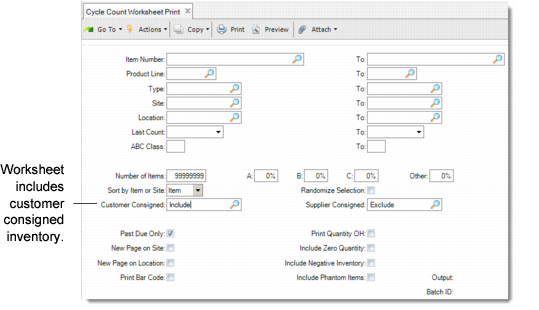
For example, you can use consignment fields in Cycle Count Worksheet Print (3.13.1) to select inventory to count.
Tracking Consigned Inventory Using Cycle Count Worksheet Print (3.13.1)
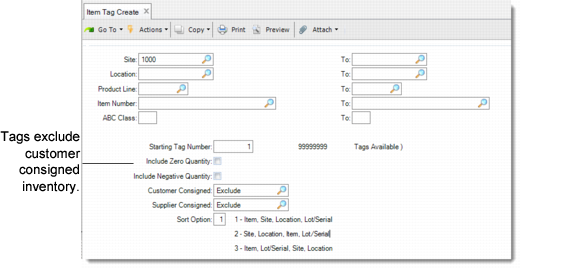
Similarly, when you use Item Tag Create (3.16.1), you can choose to update tags for only consigned, only non-consigned, or both types of inventory.
Tracking Consigned Inventory Using Item Tag Create (3.16.1)
When you exclude consigned inventory or include it with non-consigned inventory, any adjustments required by the count affect non-consigned inventory only. If you choose to count consigned inventory only, the system uses special transactions when adjusting inventory downward.
These transactions occur in Cycle Count Results Entry (3.13.2) and Inventory Balance Update (3.16.21).
Downward adjustments to customer consigned inventory create the standard count transaction (CYC-CNT or TAG-CNT) and a CN‑CNT transaction. The CN-CNT transaction is used to reverse the inventory effects of the standard transaction. This is followed by an ISS-SO and CN-USE to track the inventory changes and transfer ownership of the material. Whenever the system updates consigned inventory, appropriate updates are also made to corresponding consignment accounts.
Balancing Consigned Inventory After Cycle or Physical Counts
Option Entered | Results | Action | Transactions |
Only consigned
| Shortage | Shortage is reduction of consigned inventory. | CYC-CNT or TAG-CNT
CN-CNT
ISS-SO, CN-USE |
Surplus | Surplus is non-consigned. | CYC-CNT or TAG-CNT |
Include consigned and non-consigned
| Shortage | Shortage is reduction of non-consigned inventory. | CYC-CNT or TAG-CNT |
Surplus | Surplus is non-consigned. | CYC-CNT or TAG-CNT |
Exclude consigned
| Shortage | Shortage is reduction of non-consigned inventory. | CYC-CNT or TAG-CNT |
Surplus | Surplus is non-consigned. | CYC-CNT or TAG-CNT |
Use Consignment Inventory Adjustment (7.18.25.1) to associate the surplus (non-consigned) inventory to a consignment order if needed.