Setting Up Supplier Profiles
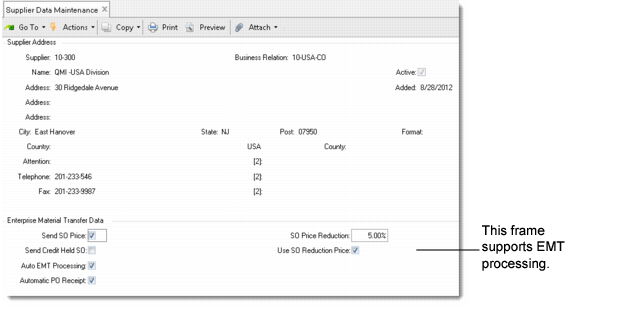
Use Supplier Data Maintenance (2.3.1) to set up EMT processing defaults for existing suppliers.
To create new SBUs, use Supplier Create to create supplier records first; then use Supplier Data Maintenance (2.3.1) to complete the setup of SBUs. The new supplier name will also be used to create the SBU site later.
Supplier Data Maintenance (2.3.1)
The fields in the Enterprise Material Transfer Data frame support EMT order processing for suppliers.
Send SO Price
Yes indicates that the supplier is authorized to receive the original sales order price from the PBU. No indicates that the supplier is not authorized to receive the original sales order price.
Send Credit Held SO
Enter Yes to have this supplier receive EMT purchase orders from SOs placed on credit hold at the PBU. Enter No to prevent the supplier from receiving these purchase orders.
This field is related to the EMT Credit Flow field in Customer Data Maintenance, which determines whether credit information is transmitted with a sales order.
Auto EMT Processing
This field is used only for multilevel EMT processing. Enter Yes to have level 2 business units automatically generate secondary POs for lower-level business units. See
Using Multilevel EMT.
Automatic PO Receipt
Enter Yes to have the PBU automatically receive the SBU’s purchase orders on EMT direct shipment items when the PBU imports the SBU’s ASNs. This lets you complete the order cycle on direct shipments without requiring a user to manually receive the PO shipper.
SO Price Reduction %
Enter the mark-down percentage to use when Use SO Reduction Price is Yes.
Use SO Reduction Price
Enter Yes to reduce the price of items ordered from the supplier by the specified SO price reduction percentage. The SO reduction price calculation is similar to a markdown. Enter No to use standard SO prices without any reduction percentage.
Note: This feature is available on direct shipments because the PBU never actually needs to physically receive the items shipped by the SBU. The PBU still must receive purchase orders manually on EMT transshipments.