Setting Up Customer Profiles
Use Customer Data Maintenance (2.1.1) to define the default EMT type and other EMT values for customers. This process is not limited to EMT orders.The system uses these values to:
• Determine the default processing mode for sales order lines for this customer.
• Determine whether credit status information is included in purchase orders generated to fill demand from this customer. This feature lets your suppliers automatically place credit holds on their secondary sales orders when the primary sales order is on credit hold.
• Establish a customer’s EMT shipping lead time. The system uses this data when calculating the due date.
• Determine whether imported EDI or EDI eCommerce documents with PO data create confirmed or unconfirmed secondary sales orders at the SBU.
The PO Required field in Customer Data Maintenance has special significance for EMT. Set this field to Yes at the PBU for customers normally involved in EMT processing. When Yes, all sales orders for this customer must have a corresponding PO number. This is required for EDI transmissions between the PBU and SBU.
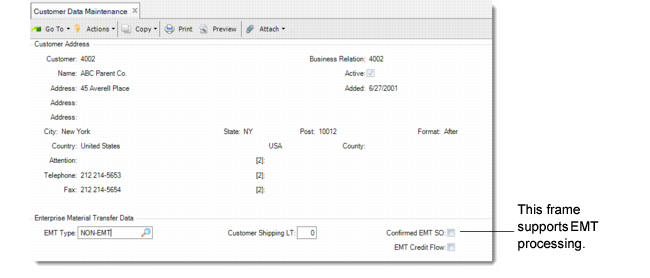
Customer Data Maintenance (2.1.1)
The fields in the Enterprise Material Transfer Data frame support EMT order processing.
EMT Type
Determines the default EMT type, either transshipment or direct shipment, or instructs the system to use standard, non-EMT processing.
Customer Shipping LT
Enter the customer’s shipping lead time. This is the average number of days needed to get the items to the customer on time. This value is added to the purchase lead time for the item, and the total subtracted from the end customer’s required date. The result is the due date used on the EMT purchase order. See
Calculating Due Dates.
Confirmed EMT SO
Indicate whether imported EDI messages with PO data create confirmed or unconfirmed sales orders at the SBU. Enter Yes to specify that a confirmed secondary SO be created. Enter No to specify that unconfirmed SOs be created. This field does not affect processing at the PBU.
EMT Credit Flow
Enter Yes to have EDI transmit the credit status of the order so that credit-held primary sales orders result in credit-held secondary sales orders. Enter No if credit information should not be transmitted. See
Credit Held Orders.
This field is related to the Send Credit Held SO field in Supplier Data Maintenance, which determines whether a supplier is authorized to receive purchase orders generated from credit-held sales orders.