Setting Up Item Cross-References
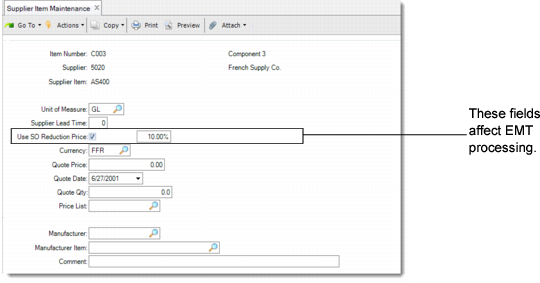
Use Supplier Item Maintenance (1.19) to set up supplier items at the PBU so that EMT purchase orders transmitted to the SBU reference the correct item numbers. Two fields affect EMT order processing.
Supplier Item Maintenance (1.19)
Use SO Reduction Price
Enter Yes to specify a reduction percentage.
Reduction Price Percentage
If use SO Reduction Price is Yes, enter a reduction price percentage. The sales order price is marked down based on the percentage you specify. For example, if the sales order price is 10 USD and you specify a reduction of 10%, the final price is marked down to 9 USD.
You can also update similar fields in Supplier Data Maintenance. These are used for items that have not been defined in Supplier Item Maintenance.
As an alternative, use Customer Item Maintenance (1.16) to set up item cross-references at the SBU. In this case, setting up supplier cross-references is not needed.
Note: If the item does not exist in the SBU side, the sales order is created for a memo item.
End Customer Item Numbers
You can also use Customer Item Maintenance at the PBU to set up item cross-references for your end customer. When an EMT item at the PBU is associated with a customer item number, that number is exported to the SBU as part of the EMT purchase order. It is stored at the SBU in the secondary sales order record, although it does not display anywhere on the user interface.
When the item is directly shipped to the end customer, the customer’s own item number prints on the shipping document. If no cross-reference has been defined, the system prints the regular item number on the shipping document.