Change Management
Changes flow through multiple levels of a supply chain. Some changes are automatic. For example, changes to quantities made by a level 3 supplier flow automatically through level 2 business units, for review at level 1. Others require manual processing. For example, a change in the due date made at level 3 requires a review at level 1.
There are three categories of change management involved when processing multilevel EMT sales orders:
• Changes to the quantity and due date on a sales order line.
• Changes to the EMT supplier or the EMT shipping type.
• Status changes triggered by activities to EMT orders at lower-level business units.
Change processing is different at each level within the supply chain.
• Quantity and due date changes can be initiated at level 1 and level 3 business units, but not at level 2 business units.
• Quantity changes are processed automatically through level 2 business units (top down and bottom up).
• Date changes are propagated automatically through level 2 business units.
• Status changes are propagated automatically through level 2 business units.
• Changes originating at a level 1 are automatically accepted at level 3.
• When a level 2 business unit receives an accept (or reject) message from a lower level business unit, the level 2 business unit acts on the message and passes the message up to the next level.
Quantity or Due Date Changes Initiated at Level 1
Quantity or due date changes can only be initiated at level 1 or level 3 business units, not at a level 2 business unit.
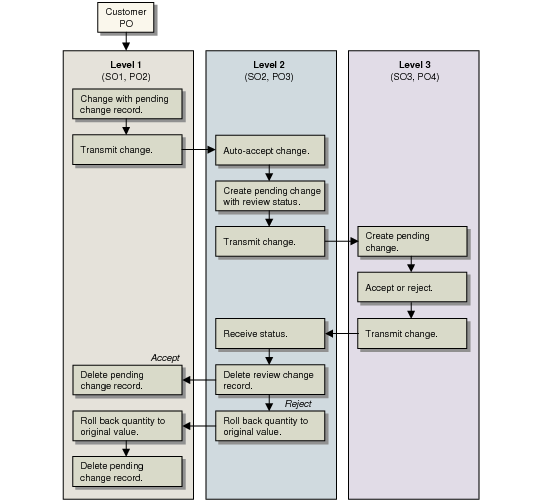
If the quantity or due date change is initiated at level 1, a change record with a Pending status is created in Sales Order Maintenance and the record is queued for export. The change is sent to the level 2 business unit by exporting an EDI PO change document.
When the change is received at level 2, the level 2 business unit exports a PO change document to level 3. The level 3 business unit now creates a change record with a pending status.
Quantity or Due Date Changes Initiated at Level 1 shows the process flow for a quantity or due date change initiated at level 1.
Quantity or Due Date Changes Initiated at Level 1
Quantity or Due Date Changes Initiated at Level 3
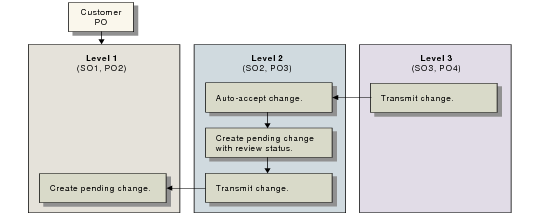
If the quantity or due date change is initiated at level 3, the level 3 business unit exports a PO Change Acknowledgment to level 2. The level 2 business unit automatically accepts the change and exports a PO Change Acknowledgment to level 1. The level 1 business unit accepts or rejects the change. If it rejects the change, the order will be compromised and must be resolved manually.
Quantity or Due Date Changes Initiated at Level 3 shows the process flow for a quantity or due date change initiated at level 3.
Quantity or Due Date Changes Initiated at Level 3
Status Changes
Status changes occurring when an order is picked, shipped, or released to a work order can only be initiated at a level 3 business unit.
If the level 3 business unit initiates a status change to its order, the changes are exported to the level 2 business unit by a PO Change Acknowledgment. The level 2 business unit automatically accepts the change and exports a PO Change Acknowledgment to level 1. Whether the PBU can make changes after receiving a status change is determined by settings in Sales Order Control.