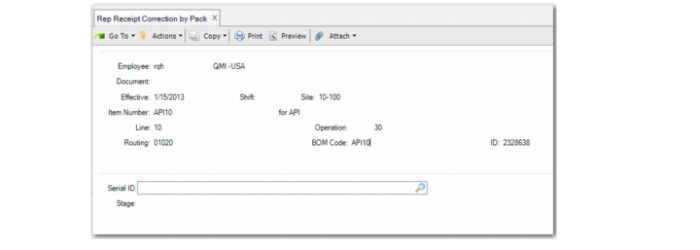
Rep Receipt Correction by Pack
Use Rep Receipt Correction by Pack (18.22.7.3) to receive a negative quantity so that the system can remove inventory packs you previously received. So, you use this program to reverse what you received with Pack Receipt by Production Line.
The system removes previously received packs from inventory and reduces the quantity in the output queue at the last operation. The system does not return components associated with the last operation to the work center location. Therefore, you are required to reverse the backflush using a backflush transaction. The correction only occurs at the last operation.
When you use this program, note the following regarding backflush transactions:
• You can receive both serialized and non-serialized WIP items and backflush their components by using QAD EE backflush programs when the operation is not the last one.
• When you correct non-serialized finished goods by pack or serialized inventory using Repetitive Receipt Correction by Pack and reverse a backflush using a QAD EE Backflush Transaction, make sure that the system does not double the return of finished goods in Backflush Transaction. To make sure of this, set Qty Processed to 0 (zero), then manually backflush the components.
• When the system reverses the backflush automatically, it receives the components back automatically when all components are not serial controlled. Otherwise, you are required to manually scan the item serial ID to reactivate it.
• The system only reverses backflush components without issuing the finished goods from inventory when you reverse the backflush at the last operation for finished goods that are set for mandatory Serialization control in Item Master Maintenance or when non-serialized loose inventory is not sufficient. For this situation, issue the inventory of finished goods using Rep Receipt Correction by Pack.
When you use this program, there is an impact on the Pending PO Shipper Unload and PO Return by Pack programs. When you reverse a receipt in PO Shipper Unload or return packs in PO Return by Pack and enter a subcontract PO, the system reverses the backflush components of the subcontract operation and uses the processing logic of EE backflush programs when you set Modify Backflush to No.
Navigation
This program consists of several frames.
In the Repetitive Order Selection frame, you select the repetitive order to produce; other fields to validate are the same as those fields in Pack Receipt by Production Line. Operation and ID are display only.
1 Enter the serial ID of the finished goods to be returned. Make sure that the entered serial ID meets the following conditions:
• Was previously received through Pack Receipt by Production Line.
• Is set to active or aggregated on an active master pack. When you enter a serial ID that is aggregated on an active master pack, the system removes the pack automatically. You can remove packs manually. The items in the pack must match the item you entered in the Repetitive Order Selection frame.
• Can be an assembly pack with single items. When you enter an assembly pack, the system returns the entire pack.
• Can be in a unit pack. When you enter the unit pack that holds serialized items, the system returns all items in the pack. When you enter the unit pack that holds non-serialized items, you must enter the return quantity in Inventory Data frame.
The entered serial ID can be an item serial ID.
When you leave the Serial ID blank, the system displays the Inventory Data frame for you to enter the quantity, site, location, lot/serial, and reference.
2 Optionally, enter inventory information in the Inventory Data frame.
Rep Receipt Correction by Pack (18.22.7.3)
Serial ID
Enter one of the following:
• Serial ID of finished goods to be returned.
• Blank to display the Inventory Data frame.
• Serial ID twice to remove the serial ID from the return list.
Note: All fields within the Inventory Data Frame that displays after you enter the serial ID are described in
Inventory Data Frame.