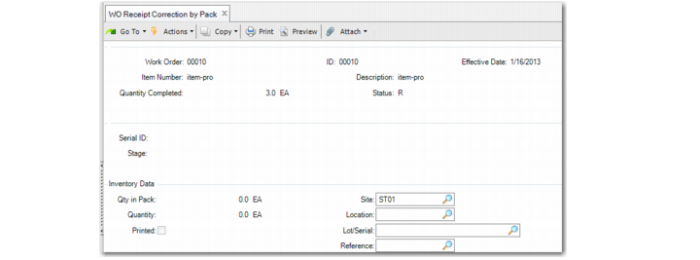
WO Receipt Correction by Pack
Use WO Receipt Correction by Pack (16.15.6) to reverse WO receipts by pack. You identify the work order and the packs to return. You can return full packs or part of a pack or return non-serialized loose items. Multiple users can use this program.
When you use WO Receipt Correction by Pack to return a serialized pack or item:
• If the serial ID was not only received but also booked for the current work order, the system keeps the link between the serial ID and the work order.
• If the serial ID was received for the current work order but not booked for it, the system removes the link between the serial ID and the work order.
• If the serial ID was not received for the current work order (with negative quantity), the system removes the link between the serial ID and the work order for which it was received.
Note: When later you use Pack Receipt by WO to receive the serial ID for the original work order again, the system displays an error message.
Reverse receipts may not exceed total previous receipts.
For all packs, when you return all content, the system changes the stage to Decommed (decommissioned).
You can enter loose serialized IDs; refer to
Loose Serialized Items in Production.
Navigation
Enter WO information in the header frame.
Specify the serial ID. When the serial ID is aggregated, the system prompts you to remove it from its parent. When Yes, the system removes the pack. When the serial ID is a unit pack that holds non-serialized items, the system displays the Inventory Data frame. When you enter a serial ID that is already in the return list, the system prompts you to remove it from the list. When you click Cancel on the Serial ID, the system displays the last frame of this program for you to enter remarks.
Specify the quantity. The system returns items based on the quantity.
Specify any non-serialized loose items, then enter additional information, such as reference data.
Confirm the WO receipt correction.
WO Receipt Correction by Pack (16.15.6)
Work Order and ID
Enter the work order number and ID for reversed receipts.
Effective
The GL effective date associated with this transaction. Defaults to system date.
Description
The system displays a description of the item.
Serial ID
You can enter a serial ID for the following:
Assembly Pack: The system returns the whole pack. When aggregated on an active master pack, the system removes the pack automatically. Make sure that the item in the pack matches with the WO item. When the pack serial ID is linked with an SO, make sure that the WO is linked with the same SO.
Unit Pack: The system returns all serialized items in the pack. You are required to receive all serialized items in the unit pack on the same work order when quantity ordered on the work order is not negative. When the quantity is negative and the item serial IDs link with a sales order, the negative work order must link with the same sales order. When you enter a unit pack holding non-serialized items, the system displays the Inventory Data frame.
Non-serialized item: When a non-serialized item is contained in the unit pack, enter the return quantity in the Inventory Data frame.
If the pack serial ID is linked with a sales order, make sure that the work order is linked with the same sales order.
Item Serial ID: The specified item is returned. When the item is aggregated on an active master pack, the system removes the item automatically. Make sure that the serialized item is received on the same work order when the quantity ordered on the work order is not negative. When the quantity is negative and the item serial ID links with a sales order, make sure that the negative work order links with the same sales order.
Blank: When this field is blank, the system returns non-serialized loose items. The system displays the Inventory Data frame for you to enter quantity, site, location, lot/serial, and reference.
Entering a serial ID twice means to remove the serial ID from the return list.
Quantity
Enter the quantity of the item to return. The default is the quantity in the pack.