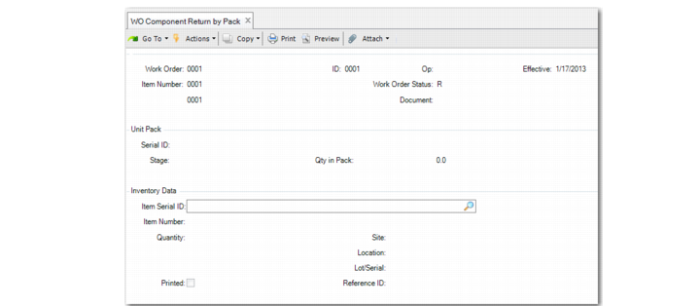
WO Component Return by Pack
Use WO Component Return by Pack (16.15.14) to receive components back to stock that were previously issued. In general, the components are received back in decommissioned pack IDs. This function supports multiple users.
You can enter both loose serialized items and loose non-serialized items; see
Loose Serialized Items in Production.
Navigation
This program contains several frames.
Enter WO information in the header frame.
Specify the pack serial ID in the second frame. You cannot enter an item serial ID in this frame, and the stage must be new or decommissioned. When new, the serial ID must be for a unit pack. When blank, you can enter item serial IDs for loose serialized items and enter item number or quantity for loose non-serialized items. Entering a serial ID twice removes it from the return list. After you enter the serial ID, the system displays the Inventory Data frame.
Specify serialized items and the quantity, which is always one for a return when you scan the item serial ID. When the item serial ID is blank and you enter an item that is not a serialized item, the quantity can be more than one.
Confirm that all information is correct, then press Yes to return the components and review the return list. For all packs and item serial IDs, the system changes the stage to Active, updates the WO bill, and prompts you to print labels.
WO Component Return by Pack (16.15.14)
Work Order and ID
Enter the work order number and ID for the issued components to return.
Op
Enter one of the following as the operation where the components are in use:
A valid operation: When you enter an operation with a component that is not on the work order, the system checks Regulatory Attributes Control to determine whether the component can be processed. When Yes, the system treats the transaction as a negative unplanned issue; that is, the system issues the component to the work order, but does not modify the component requirement.
Blank. When blank and one component was issued in one or multiple operations, the system automatically picks the blank operation first, then other operations in descending order to decrease the quantity issued.
Effective
Enter the GL effective date associated with this transaction. The default is the system date.
Document
The legal document ID associated with the transaction.
Serial ID
Enter the serial ID for the issued product that you want to return.
The stage of the pack serial ID must be new or decommissioned (decommed). When the stage is new, it must be a unit pack. When the stage is decommed, the system assumes that it is a unit pack. You cannot enter an item serial ID in this field.
Blank is allowed and indicates that you enter loose items.
Entering a serial ID twice means to remove the serial ID from the return list.
After you enter the serial ID, the system displays the Inventory Data frame.
Item Serial ID
Enter the item to be returned. Make sure that the item is consumed and has been issued to the same work order. The system builds it to the unit pack when unit pack Serial ID is not blank. The system displays Item Number, Quantity, Lot/Serial, and Reference for the Item Serial ID. Blank is allowed.
Note: When the Item Serial ID is returned to a work order with negative quantity ordered, the item serial ID could be issued to another work order.
Item Number
Enter the item to return. This field is editable only when you leave Item Serial ID blank. The system builds the items to the unit pack when you enter a unit pack serial ID in the Serial ID field. The item must match when the pack serial ID stage is new.
Quantity
Enter the quantity of items to return. For the item serial ID, it is always 1.