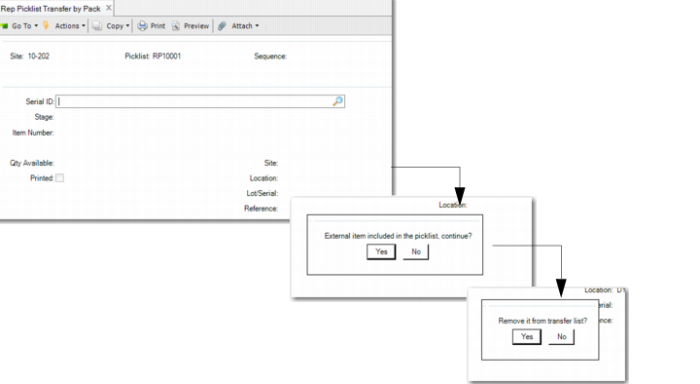
Rep Picklist Transfer by Pack
Use Rep Picklist Transfer by Pack (18.22.7.5) to transfer by serial ID and transfer inventory from the stocking location to the work center location. Optionally, you can use this program to decommission after you transfer.
For repetitive picklist transfers using QAD Repetitive Picklist Transfer, the system displays an error message, informing you to use Rep Picklist by Pack to transfer components when:
• All items of the selected picklist are mandatorily serial controlled through a setting in Item Master Maintenance.
• When you enter a serialized component, the system prompts you to use Repetitive Picklist Transfer by Pack.
• When components on the picklist are not serialized, and you check the inventory of loose items in the site, location, lot, and reference, then enter a quantity that is less than the quantity to transfer but the total QOH is enough for the transfer.
The system displays a warning in Repetitive Picklist Transfer by Pack, informing you that the pack/item serial ID to transfer contains items not included in the picklist.
Navigation
This program consists of several frames.
1 Enter the picklist, site, and sequence to transfer in the Picklist Selection frame; then press Return.
2 Enter the serial ID to transfer in the Serial ID frame.
The system prompts you to include external items in the picklist when the pack holds items that are not in the picklist. When all items in the scanned serial ID are in the selected picklist, no messages display. The system then prompts you to remove the serial ID only when you scan a previously scanned serial ID. This is the equivalent of undoing the scan. The system does not transfer the serial ID when you confirm. Once you transfer, the system provides an option to decommission the pack (not the item); see
Rep Picklist Transfer by Pack (18.22.7.5).
The Stage, Item, Qty in Pack, Site, Location. Lot Number and Reference indicate the inventory data of the serial ID entered and are read-only.
Rep Picklist Transfer by Pack (18.22.7.5)
Site
Enter the site for the repetitive schedules and work centers (locations) and the picklist to use when transferring goods.
Picklist
Specify the ID of the picklist for the inventory to transfer.
Sequence
Specify the sequence number for the transfer.
Use to Location Status
When the From Location and To Location have different statuses, specify Yes to use the To Location status.
Serial ID
Enter the serial ID of goods to transfer. Browse for serial IDs previously entered by using the Up and Down keys.