Creating the XML File
The following section describes rules and editing guidelines for XML file content.
tContextInfo Table
Each component schema file contains a tContextInfo table, which must be included in the XML file to be processed. This table is necessary for the system to process the XML file correctly.
tContextInfo contains the following fields:
• tcCompanyCode
The tcCompanyCode field is mandatory, and indicates the code for the entity in which the data will be processed. If you do not specify the company code, the company code of the current XML daemon process is used, which can lead to data conflict. The daemon does not give an error if this code is not specified.
• tcAction
The tcAction field is optional. The value of tcAction will only be taken into account if the XML daemon is configured so that the default action specified in the daemon configuration can be overridden by the tcAction specified in the XML file.
The possible values for tcAction are:
• save
The data is passed to the back end, and the system attempts to validate and save it. If this is not successful, the load of the XML document fails.
• store
The data is passed to the back end. The system does not validate it, but saves the data as a draft object.
• validate
The data is passed to the back end and the system tries to validate it without saving to the database.
• savestore
The data is passed to the back end, and the system tries to validate it. If the data validates, it is saved to the database. If it does not validate, the data is saved as a draft object. In Create mode it means that the object is not available as a real object in the system yet, and needs to be completed. In Modify mode the modification of the object is incomplete, and it can be completed only by completing the draft object.
• tcOriginator
The tcOriginator field is optional. (XML daemon only). It can be used by the external party to specify the origin of the data. This can refer to an originator defined within the configuration of the XML daemon, and can indicate if the default action for the originator can be overridden by the value in the XML file.
• tiPriority
The tiPriority field is optional. (XML daemon only). It can be used to indicate the priority of the XML document. The XML documents in the queue are processed in order of the lowest value set in tiPriority.
• ttRequestStartDate
The ttRequestStartDate field is optional. (XML daemon only). It can be used to indicate that the object in the XML document can only be processed after a certain date.
• tiRequestStartDate
The tiRequestStartDate field is optional. (XML daemon only). It is useful in combination with ttRequestStartDate to specify an integer value for the time before which the XML document will not be processed.
• tcComment
The tcComment field can be used to specify extra comments for the XML document in the queue. (XML daemon only). It can be viewed in the XML daemon monitor.
Note: The tcComment field can also include:
PartialUpdate=<true/yes>
PartialUpdateExceptionList=t<table>.<field>
These fields exist as separate configurable fields in later releases and are described in
tlPartialUpdate.
• tcCBFVersion
The tcCBFVersion field is mandatory and should contain the expected Component Builder version number. This field defines the way in which the XML document is constructed. (XML daemon only). The current version is 9.2.
• tcActivityCode
The tcActivityCode field is not mandatory, but is used to indicate the activity that needs to be executed for the data inside the XML document. If the tcActivityCode field is not specified, or left blank, the system decides the activity. If it cannot find the object based on the alternate key, it assumes the object must be created, and assumes that the activitycode is Create. If it finds the object, it assumes the activitycode is Modify. Possible values are:
• Modify
The object is taken in Modify mode. If this is specified, the validation will return an error if the object does not exist (based on the alternate key field search).
• Create
The object is taken in Create mode. If this is specified, the validation will return an error if the object already exists (based on the alternate key field search).
• Delete
The object is taken in Delete mode. The system tries to find the object, and deletes it.
• tlPartialUpdate
The tlPartialUpdate field is optional. It can be used to indicate how the system should treat the data that is passed to it. By default the value of this field is false; this means that the data supplied in the XML document is assumed to be complete. This is typical for a Create activity. For a Modify activity, however, tlPartialUpdate is useful in preventing the need to pass the complete component with all fields. This can be difficult when components have records in multiple class tables.
If tlPartialUpdate is set to true, the data supplied in the XML document is assumed to be incomplete. This allows for the situation in which there may be missing tables or fields. The system then performs a partial update, and does not try to assign default empty values to these fields, or delete child records.
However, you also have the option to identify records to be deleted. By assigning the tc_Status field of a child record to D, you indicate to the system that this record is to be deleted.
In this way, you can use the PartialUpdate option to supply only relevant field data for integration instead having to supply the complete dataset. PartialUpdate not only disregards fields that were missing in the input, but also disregards fields that are passed with an unknown value.
• tcPartialUpdateExceptionList
The tcPartialUpdateExceptionList field is not mandatory, and is only read by the system when the tlPartialUpdate field is set to true.
When a field has an unknown value, the system assumes that this field does not need to be updated. Use the tcPartialUpdateExceptionList field to specify a comma-separated list of fields that must be updated in the database, even if their value is unknown.
The syntax for the exception list field names is t<table-name>.<field-name>.
Example: tBusinessRelation.BusinessRelationName1
Rowid Fields
The values of the rowid fields in the XML document are used to map the parent-child relationships between tables. You can assign any values to these fields, while ensuring that the tc_parentrowid of the child record matches the tc_rowid of the parent. When the system processes the XML files, it uses this matching to map the tables, then assigns its own values to the rowids in the database.
Important: The tc_rowid value must be unique within the records of the same table in one XML document.
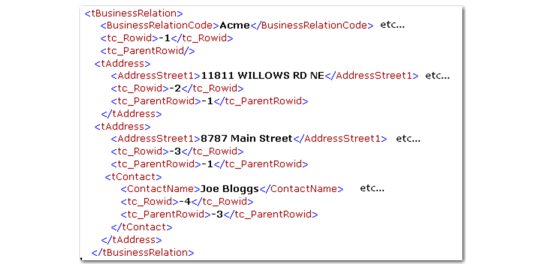
Example: An XML file containing business relation data contains the tables tBusinessRelation and two tAddress tables, one of which contains a tContact table.
To map these tables, you set the value of the tc_rowid of the tBusinessRelation record to -1.
The tc_parentrowid values of the tAddress child records are therefore also set to -1.
The tc_rowid values of the tAddress tables are set to -2 and -3.
The tContact table is the child of the tAddress table whose tc_rowid is -3. Its tc_parentrowid is therefore set to -3, and its tc_rowid to -4.
Parent/Child Relations
You must specify the rowid fields if you have multiple record requests in your XML request.
Custom Fields
Most tables contain custom fields (for example, <CustomShort0/>, <CustomShort1/> ). Unless you have used these fields for customization, you can remove them from your document.
All components have also tCustomTable0, tCustomTable1 and tCustomTable2 tables in their schema file. These are not mandatory and can also be used for customization of the business component. If defined, you may want to keep this fields in your document.
Last Modified Fields
These fields are generated by the system and can be removed from your document. For example:
<LastModifiedDate>2009-01-15</LastModifiedDate>
<LastModifiedTime>9874</LastModifiedTime>
<LastModifiedUser>mfg</LastModifiedUser>
ID Fields
ID fields are not necessary for XML integration. These fields are generated by the Financials component when the file is processed.
You can remove these fields automatically using the Only Dump Fields for Import option in the Dump XML feature (see
Sample XML Files). For XML files that have not been created using this option, you can remove the ID fields manually.
For example, in the following section of a supplier invoice sample XML file, you remove the CInvoice_ID, Company_ID, Period_ID, Creditor_ID, Division_ID, and Journal_ID fields, but retain the CInvoiceType and CInvoiceVoucher fields:
<CInvoice_ID>738175</CInvoice_ID>
<Company_ID>9144</Company_ID>
<Period_ID>16683</Period_ID>
<Creditor_ID>173655</Creditor_ID>
<Division_ID>11438</Division_ID>
<Journal_ID>271904</Journal_ID>
<CInvoiceType>INVOICE</CInvoiceType>
<CInvoiceVoucher>0</CInvoiceVoucher>
Primary Key Fields
Primary key fields are a combination of fields that combine to uniquely identify the object in the system.
For example, the primary keys for Supplier Invoice and Journal Entry are a combination of Entity, Posting Year, Daybook, and Voucher. The Entity, Posting Year, and Daybook require values in an XML file to be integrated. The Voucher field is generated by the system.
When you modify or delete a record, the <AddressLogicKeyString> key field is also required. You can view the field by dumping the XML for a particular business object using Actions|Properties and then Dump XML. You can also query the AddressLogicKeyString key field using a Progress editor.
Note: You cannot view the <AddressLogicKeyString> field in the user interface.