QAD 2017 Enterprise Edition
>
User Guides
>
System Administration
>
Database Management
>
Registering Licenses
Registering Licenses
When you receive your QAD software, you also receive license codes for the foundation product and other separately licensed applications.
The license codes identify the license type, version, expiration date and number of days remaining, and number of users, sessions, or transactions for which your site is licensed. Before you can use the system, you must register the license codes.
License registration programs are provided under the License Registration menu (36.16.10). Use the license registration programs to:
• Register newly installed software.
• Upgrade software to add new users or sessions.
• Maintain and report historical license data.
• Report detailed and summary license violations.
• Report license usage and user activity for QAD-conducted audits.
Licensing Overview
QAD licenses software to its customers for use by a predetermined number of users, sessions, or transactions.
The following sections describe concepts associated with license types, license violations, violation types, violation messages, and registration interaction with other QAD modules.
You can use User Monitor Inquiry (36.16.12) or other license-related reports to monitor user activities and application use.
Licensing updates and data, such as user counts and violations, are recorded in Universal Time, Coordinated (UTC). See
UTC and Transactions Outside Domains.
License Types
Two license types apply to users:
Named User
Each unique user ID defined in User Maintenance (36.3.1) is counted as a user. There is no limit on the number of sessions each defined user can run simultaneously. Multiple sessions for the same user ID are counted as one user.
Concurrent Session
Each concurrent login is counted as a session. If a single user logs into multiple sessions simultaneously, each login is counted. See
Violation Types.
User Counts
License usage is monitored regardless of your user interface type, database type (Progress or Oracle), or license type.
For concurrent session license types, the system counts the number of active sessions when you log in and compares the count to the number of licensed sessions stipulated by the license agreement.
If you change to a domain in another database, this process is repeated because changing databases is exiting the current database and starting a new session. Whenever you switch databases, the system stores the logout date and time. The time is recorded using UTC.
Note: If you use the QAD .NET UI, each time you run a program and detach it in a separate window, each window counts as an individual session.
For named user license types, the software counts users when system administrators create new users in User Maintenance (36.3.1) or activate user access to applications in License Registration (36.16.10.1). See
Violation Messages.
License Violations
When the number of users or sessions exceeds the number stipulated by your license agreement, license violations occur.
The system stores all license violation occurrences in the database. System administrators and QAD auditors can run reports to view the violation data. See
License Reporting.
The system responds to license violations with either violation errors or violation warnings. With errors, messages display and the system prevents additional users or sessions. With warnings, messages display, but additional users or sessions can exist and users can still log in to QAD applications.
System administrators can implement enforcement of license agreements by selecting the Enforce Licensed User Count field in Security Control (36.3.24). Setting this field determines whether errors or warnings display and what action the system takes. For more information on Security Control, see
QAD Security and Controls User Guide.
Important: The first time a warning displays, you can continue log in to complete transactions or other processing. If you receive repeated warnings, contact your QAD sales representative or distributor to upgrade your license.
The system prevents users from logging in if the license registration record does not exist for the foundation product in License Registration (36.16.10.1).
Violation Types
The system records the violation types listed in
License Violation Types.
License Violation Types
|
Violation Type
|
Description
|
|
Date Expiry
|
Displays information about violations that occur when an application’s license registration expires. Only evaluation, demo, or temporary licenses have expiration dates.
|
|
Application Usage
|
Displays information about violations that occur when users do not have access to an application.
|
|
License Count
|
Displays information about violations that occur when the number of users or sessions exceeds the amount stipulated by the license agreement.
|
|
Non-Licensed Product
|
Displays information about violations that occur when users attempt to run applications that are not registered.
|
Violation Messages
License Violation Error Messages lists error messages that display when license violations occur.
License Violation Error Messages
|
Message
|
Explanation and Solution
|
|
Expired license code
|
The license code expiration date for this application has passed.
Contact your QAD sales representative or distributor to obtain a new license code. Register new code in License Registration (36.16.10.1).
|
|
Product registration is not valid
|
The licence code data in your environment has been corrupted or is missing.
Contact your QAD sales representative or distributor to obtain the correct license code; register correct code in License Registration.
|
|
Application not available in licensed application master
|
Your environment license data has been corrupted or is missing.
Contact customer support to reload valid license data.
|
|
Licensed user limit exceed
|
This message displays in User Maintenance and License Registration when the number of users exceeds the number specified by the license.
System administrators can deactive some users; otherwise, contact your QAD representative or distributor to upgrade your license agreement.
|
|
Customer is not licensed to execute this module/product: #
|
You selected a menu item that is not covered by registered license codes.
Contact your system administrator to determine the correct menu items for you to access.
System administrators should contact their QAD representative or distributor if the license code is not correct or if they wish to purchase this additional module.
|
|
User not authorized to run this application: #
|
You have not been authorized to run this product.
System administrators authorize users to use products in User Maintenance or License Registration.
|
|
This product expires in # days on #
|
The license code for this application expires in the number of days indicated.
Contact your QAD sales representative or distributor to obtain a new license code; register correct code in License Registration.
|
|
Concurrent session limit exceeded
|
The application you are attempting to access has a concurrent session license type and the maximum number of active sessions for this application has been reached.
If this error displays during login, you cannot log in unless another currently logged-in user logs out.
|
Interaction with Other System Data
The license registration programs use data from other programs to process, maintain, and report license data.
System administrators maintain defined named users and a list of registered software applications that users are authorized to access in User Maintenance (36.3.1). License registration software uses this information to prevent more active users than the license allows.
User Maintenance also includes information that more clearly defines the user. The system ships with a default set of user types predefined in Language Detail Maintenance (36.4.2). The set includes the employee, customer, and QAD user types. It is important for user count and system monitoring purposes that users are correctly identified in User Maintenance before complete license registration functionality can be used. See
Language Detail Maintenance.
License Registration
Use License Registration (36.16.10.1) to:
• Add a new license code for the foundation QAD software or separately licensed QAD modules.
• Upgrade license codes to add sessions or users.
• Remove license codes.
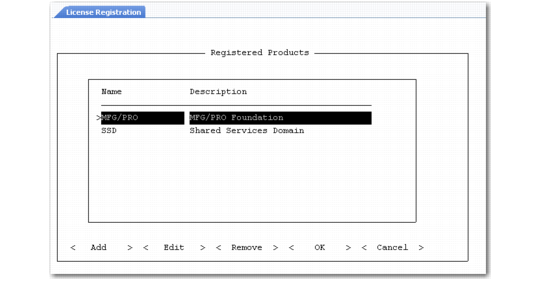
License Registration (36.16.10.1)
The system requests licensing information after you install your base QAD application or separately sold modules and when you attempt to log in with an expired license.
Use the Tab key to select a license code task:
Add
The Add Product frame displays. Enter the license code for the foundation product or a separately licensed module; then choose OK.
The application name, description, version, license type, and number of licensed users display.
When you add a license code, you are prompted to enter the IDs of users who can access the application. A list of users who can access the product displays once you enter a user ID. See
Granting Users Access to Registered Software.
If you try to add an application that is already registered, the following message displays:
Product already installed
Edit
The Edit Product frame displays. Use this frame to upgrade your license to increase users or sessions.You must obtain the new number from your QAD representative or distributor.
After you enter the code and choose OK, you are prompted to enter the IDs of users who can access the application.
Remove
The Remove Product frame displays. Enter the license code for the application you want to remove from registration. A prompt displays, asking you to confirm the license removal. If you select Yes, the system records the removal date and time. The application is no longer registered, and users cannot execute any programs that are a part of it. If you remove the MFG/PRO license code, you will be logged out of the system, and users cannot log in.
Granting Users Access to Registered Software
You must grant users access to registered software. If a user who does not have access tries to start an application, either an error or warning message displays depending on the value of Enforce Licensed User Count in Security Control (36.3.24).
Access to applications is granted in one of two ways:
1 Assign access to individual users by selecting registered applications in the Application List frame in User Maintenance (36.3.1). For more information on User Maintenance, see
QAD Security and Controls User Guide.
2 Activate users for a newly registered application in License Registration (36.16.10.1).
After you successfully enter a license code in the Add Product or Edit Product frames, the system displays the Add Authorized Users frame. You can specify a user ID to display a list of users starting with this ID or enter the word All. When you enter All, the list displays with all users selected, as indicted by an asterisk. You can deselect any that you do not want to include.
Note: If the total number of users exceeds the number allowed by the application license, the system makes the first users in the list active. For example, if there are 100 user IDs displayed, but the license agreement for the application is for 50 users, the first 50 users are made active for the application.
If you need to authorize more users than your license allows, system administrators can add users through User Maintenance (36.3.1); however, the software records a violation of your license when you add more users.